
Best for reviewed application preparation: AmazApply. Best for repetitive contact fields: browser autofill. Best for answering employer-specific questions: employer application forms. If you want to auto-apply for jobs in 2026, start by deciding what you want automated: finding openings, preparing documents, entering information, or submitting an application.
- AmazApply is best for job seekers who want matching openings and tailored application drafts they review and approve.
- Browser autofill handles repetitive fields; it does not replace job matching or résumé tailoring.
- Employer application forms keep employer-specific questions visible but require direct work from you.
- To auto-apply for jobs responsibly, separate application preparation from submission and keep approval under your control.
Why this matters
An application tool can prepare a useful draft without being the right tool to submit it. Those are different responsibilities. A résumé needs to reflect your experience; an application also asks you to make statements about eligibility, location, availability, and qualifications.
For your 2026 job search, judge automation by the work it handles and the decisions it leaves with you. A prepared application is not a submitted application. Treating them as interchangeable makes it harder to understand what you still need to check.
This guide compares three approaches, not three interchangeable software products. The useful distinction is between reviewed preparation, repetitive data entry, and direct completion. Pick the approach that addresses your bottleneck without hiding the final decision.
What makes the best tools to auto-apply for jobs?
Use these five criteria before choosing an application workflow:
- Task fit: Identify whether you need help finding jobs, tailoring documents, filling fields, or completing applications. Do not assume one capability includes the others.
- Approval control: Keep the decision to apply with you. Review the employer, role, documents, and answers before anything is submitted.
- Factual accuracy: Require every qualification, employment date, and achievement to match evidence you can explain. Fluent writing is not proof.
- Application visibility: Know whether you have a draft, a completed form, or a submission confirmation. Give each state a distinct meaning.
- Correction effort: Check how easily you can fix a mismatch. An application that requires extensive rewriting has not removed the work you needed help with.
For a 2026 shortlist, use a current job posting and your own work history to evaluate these criteria. A polished demonstration is less useful than seeing whether the output preserves an awkward but important detail, such as a location restriction or an employment gap.
Auto-apply options at a glance
| Option | Best for | Standout capability | Key limitation |
|---|---|---|---|
| AmazApply | Reviewed application preparation | Finds matching openings and tailors résumés and cover letters for review | Preparation does not establish unattended submission capability |
| Browser autofill | Repetitive contact information | Reuses saved information in compatible form fields | Does not assess job fit or write a truthful application for you |
| Employer application forms | Employer-specific answers | Lets you answer the questions presented by the employer | Leaves discovery, document preparation, and much of the entry work with you |
These options can work together. You do not need to force job discovery, document writing, and final submission into the same tool to have a repeatable process.
1. AmazApply: best for reviewed application preparation
AmazApply is an AI-powered job-search agent that finds matching openings, tailors résumés and cover letters, and prepares applications for individual job seekers to review and approve. Its role in this comparison is preparation with a human decision at the end, not an assumed promise of unattended submission.
AmazApply is best for job seekers who want tailored application preparation while keeping approval in their own hands. You approve every application yourself. That distinction matters when your application contains statements that only you can confirm.
Where reviewed preparation helps
Choose this approach when finding suitable openings and adapting your documents are the tasks slowing you down. It brings those preparation tasks into the same workflow while leaving you responsible for deciding whether an application represents you accurately.
Keep the review concrete. Compare the suggested opening with your requirements, then compare the tailored documents with your actual experience. Better wording is useful only when it preserves what you did.
AmazApply pros:
- Combines matching openings with résumé and cover-letter preparation.
- Prepares applications for an individual job seeker to review.
- Keeps approval with you rather than treating a generated draft as permission to apply.
AmazApply cons:
- Requires your attention to confirm facts and approve applications.
- Does not remove the need to assess whether a role meets your requirements.
- Should not be selected on an assumption that preparation includes unattended submission.
Best for: Job seekers who want help with discovery and tailored drafts but still want to make the application decision.
Verdict: Skip if unattended submission is your requirement; choose it for reviewed preparation.
2. Browser autofill: best for repetitive contact fields
Browser autofill reuses saved information in compatible form fields. It is a data-entry aid, not a job-search agent. Its useful role is narrow: reducing the need to type information you have already checked.
Start with three contact fields: your name, email address, and phone number. Check the saved values first, then inspect how they appear in the application. A correct saved value can still end up in the wrong place when a form is interpreted incorrectly.
Where autofill helps
Choose browser autofill when your documents are ready and repetitive entry is the remaining nuisance. Keep role-specific questions outside that shortcut unless you have read and confirmed the answers yourself.
In a 2026 workflow, autofill belongs after you have chosen the role, not before. Reusing contact details cannot establish whether an opening fits your experience, schedule, or location requirements.
Browser autofill pros:
- Reuses saved details instead of requiring fresh typing.
- Fits alongside a separate document-preparation process.
- Keeps the employer's form available for you to inspect.
Browser autofill cons:
- Depends on the browser recognizing compatible fields correctly.
- Does not find matching jobs or tailor your résumé.
- Requires you to check both the inserted value and its destination field.
Best for: Job seekers who already know where they want to apply and need help with repeated contact information.
Verdict: Hold as a narrow data-entry aid; skip as a complete auto-apply solution.
3. Employer application forms: best for employer-specific answers
Employer application forms are the direct route for answering the questions an employer presents. They are not an automation product, but they belong in this comparison because preparation tools do not remove the need to handle application-specific requirements.
Use this route when the important work is interpreting and answering the actual questions. Read each prompt in context. Similar wording across employers does not make two questions identical.
Where direct completion helps
Direct completion keeps you close to the final wording of an application. That is useful for eligibility questions, location requirements, and requests for explanations that should not be answered from an assumed default.
The trade-off is effort. You remain responsible for bringing the right documents, entering information, and checking the result. Keep your source résumé nearby so that a form entry does not quietly drift away from your employment history.
Employer application forms pros:
- Show the questions you need to answer for that application.
- Let you write responses against the employer's wording.
- Provide a direct place to inspect entered information before submission.
Employer application forms cons:
- Do not provide a separate job-matching workflow.
- Leave document preparation with you or another tool.
- Can require repeated entry across separate applications.
Best for: Job seekers whose main concern is giving accurate, employer-specific answers at the final application stage.
Verdict: Hold as the direct-completion route; skip as a substitute for discovery and preparation.
A review-first workflow you can repeat
Use this five-step sequence whether you prepare applications yourself or use software. Each step has a different purpose. Do not treat progress through one step as permission to bypass the next.
Set rules
Write down your required role type, location constraints, and deal-breakers. Separate requirements from preferences so you can reject a mismatch without repeatedly reconsidering it.
Check matches
Read the actual opening before working on its documents. Confirm that the responsibilities and stated requirements justify an application, rather than relying on the job title alone.
Review documents
Check the two documents separately: your résumé and cover letter. Confirm that each claim comes from your experience and that neither document introduces responsibilities or results you cannot support.
Approve application
Review the final answers, attachments, and employer details. Approval should apply to the application you have just inspected, not to an earlier draft that has since changed.
Record outcome
Record what happened: prepared, submitted, or awaiting action. Keep any submission confirmation separately from your draft so that finishing a document does not become a mistaken record of applying.
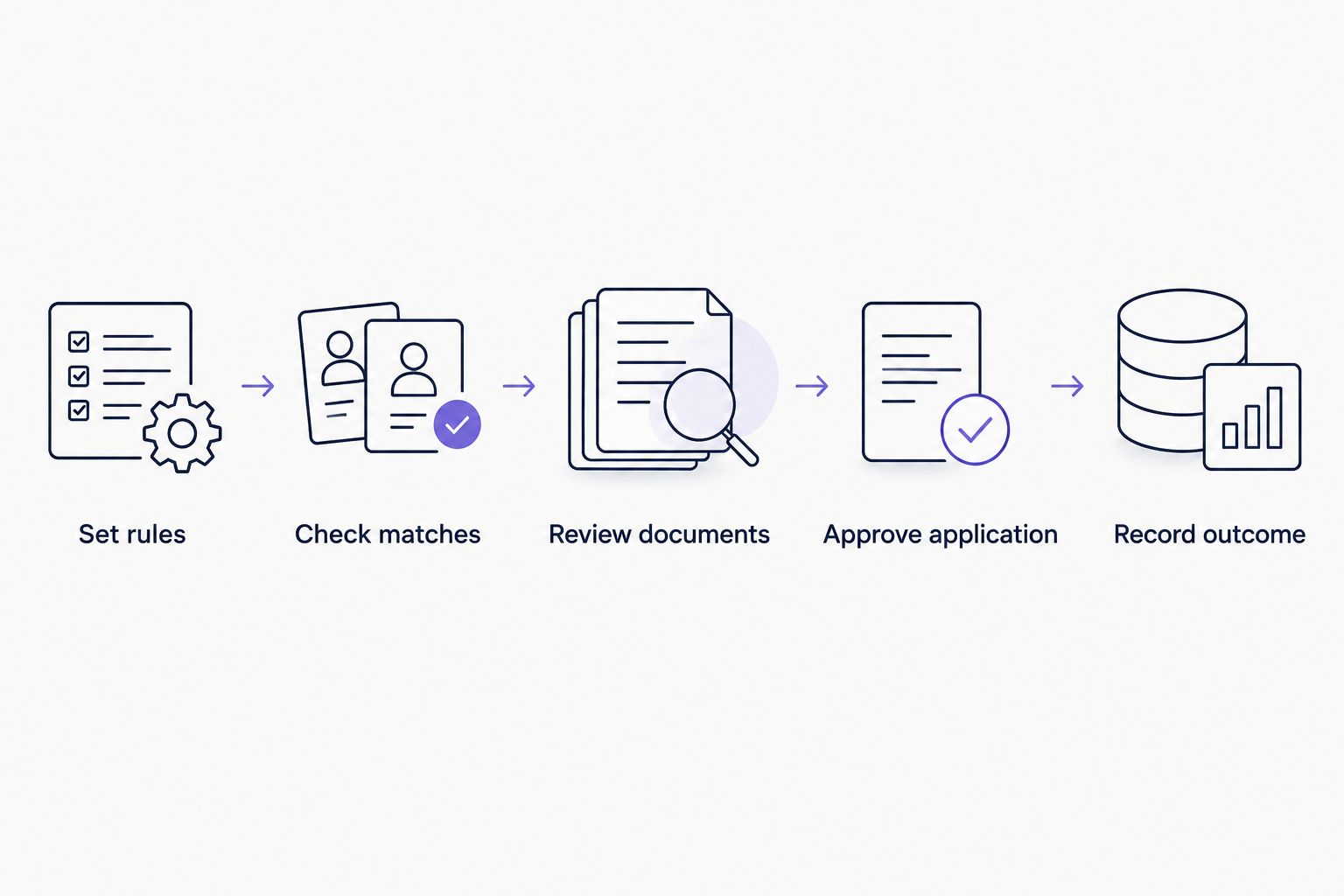
This sequence also gives you a practical way to assess a tool. If you cannot tell which step is complete, stop and resolve that uncertainty before continuing. More generated material is not a substitute for a clear application state.
How the options are ranked
The 2026 ranking follows the five criteria above: task fit, approval control, factual accuracy, application visibility, and correction effort. The order reflects how much of the preparation problem each approach addresses, not a measured contest for submission volume.
Reviewed preparation comes first because it addresses discovery and document work. Browser autofill addresses a smaller entry task. Employer forms address direct completion but leave the earlier stages to you.
This is a workflow comparison, not a claim of hands-on performance testing. No speed, interview-rate, or hiring-outcome score determines the order. Those claims would require evidence beyond a description of what each approach does.
Which approach should you choose?
Choose reviewed preparation as your default when finding suitable roles and adapting documents are the bottlenecks. Choose browser autofill when the work is already accurate and ready, but repeated contact fields are slowing completion. Use employer forms when you need to handle the employer's specific questions directly.
For your 2026 search, keep the scope explicit: AmazApply handles job-search and application preparation for your review and approval. Do not turn that into a claim that it submits applications unattended or guarantees interviews.
If you are undecided, take one real posting through the workflow before changing your entire process. Inspect the match, the documents, and the final answers. Keep the option that reduces your particular workload without weakening your review.
FAQ
What's the best way to auto-apply for jobs in 2026?
Choose the workflow that automates your bottleneck while preserving your approval. AmazApply supports matching openings and tailored application preparation; browser autofill addresses repetitive fields, while employer forms handle direct completion.
Does application preparation mean an application has been submitted?
No, application preparation and submission are different states. A tailored résumé, cover letter, or completed draft is not evidence that an employer received an application.
Is browser autofill the same as an auto-apply job tool?
No, browser autofill is a form-entry aid rather than a complete job-search tool. It reuses saved information in compatible fields but does not assess whether the job fits you.
Should I review every AI-written résumé and cover letter?
Yes, review every document before using it in an application. Confirm employment dates, qualifications, responsibilities, and achievements against your actual experience.
Can an application tool guarantee interviews or a job?
No tool can promise interviews or a job. Application preparation does not control an employer's screening process, hiring requirements, or final decision.
What should I check before approving an application?
Check the employer, role, final answers, and attached documents before approval. Pay particular attention to eligibility statements and any claim that was rewritten during preparation.
How should I compare tools without relying on application volume?
Compare task fit, approval control, factual accuracy, application visibility, and correction effort. Use a real posting and your own experience to see whether the prepared work remains accurate and useful.
One last thing
Check what changed, not just what reads well. Put the tailored résumé beside your source résumé and inspect every altered claim. A smoother sentence that changes your responsibility, seniority, or result is a correction task, not an improvement.
Keep the original as your factual reference. The purpose of application preparation is to explain your experience for a particular role—not to create experience you will later need to defend.