
Instead of rewriting your résumé from scratch for every Greenhouse posting, use greenhouse resume tailoring to map the employer’s requirements to verified experience, prepare a targeted draft, and review it before applying. AmazApply prepares tailored résumés and cover letters; you approve every application yourself.
- Greenhouse resume tailoring starts with the employer’s requirements, not a keyword score.
- AmazApply suits individual job seekers who want application preparation with personal review and approval.
- Keep a verified master résumé, a saved posting, and a separate application draft.
- Check the employer’s application instructions before uploading; preparation does not equal submission.
Why this matters
A résumé tailored to a Greenhouse posting should make relevant evidence easy to find. Repeating the posting’s language without supporting experience does not establish that you can do the work.
For your 2026 search, separate three decisions: whether the role fits, which experience supports the requirements, and whether the final application is accurate. A polished draft answers only part of that process.
AmazApply is best for individual job seekers who want résumé tailoring with personal review and approval. Its role is preparation, not a promise of interviews. No tool can promise a recruiter response or hiring outcome.
This guide uses a document-based handoff rather than assuming a direct Greenhouse integration. The headings below are labels you create in your working documents, not software buttons or settings.
Before you start
- Gather your source materials. Start with 1 master résumé, 1 saved job posting, and 1 separate output file for the application. Include verified employment dates, responsibilities, qualifications, and results you can explain.
- Keep the application accessible. Open the employer’s posting and application instructions. If you use AmazApply for preparation, have access to your account, but keep the employer’s application as a separate review task.
- Check the hidden constraint first. A tailored résumé does not answer every application question. Read the form before drafting so you catch separate eligibility questions, required attachments, or instructions that affect what you prepare.
Do not enter confidential employer information into a drafting service unless you have permission. Remove private customer names, internal financial details, and other restricted material from your source notes.
Source capture
The first configuration unit is a stable record of the job and your evidence. Save both before editing anything; otherwise, you lose the distinction between what the employer requested and what you actually supplied.
- Create a document heading named Posting record. Record the employer, role title, posting location, source address, and the date you captured it. For a posting captured during your 2026 search, record the full date rather than only the year.
- Copy the responsibilities, required qualifications, preferred qualifications, and application instructions into separate sections. Preserve distinctions such as required versus preferred; do not turn every line into a mandatory qualification.
- Create a second heading named Evidence bank. Add relevant projects, responsibilities, qualifications, and outcomes from your actual history. Keep original job titles and employment dates intact.
- Mark each result as verified or unsupported. Keep a number only when you can trace it to a reliable record or confidently explain its basis. Remove estimates that exist solely to make a bullet sound stronger.
Expected result: You have an unchanged posting record and an evidence bank that does not borrow claims from the job description.
A posting describes the employer’s needs. It is not evidence of your experience. Keep those sources separate even when a drafting tool combines them into a fluent paragraph.
Requirement mapping
Build the mapping before requesting a rewrite. This step gives you a reason for every keyword and prevents a draft from treating familiarity as expertise.
- Add a heading named Requirement map. For each important requirement, write the employer’s wording and the corresponding evidence from your background.
- Assign an evidence status: Direct match, Transferable evidence, or Gap. Direct experience supports the same kind of work; transferable evidence supports a related responsibility; a gap has no defensible supporting example.
- Choose the strongest relevant examples for the summary, skills section, and experience bullets. Give central responsibilities more attention than incidental wording.
- Write a drafting instruction that prohibits invention. State that titles, dates, qualifications, tools, metrics, and ownership must remain consistent with the evidence bank.
Use this instruction as a starting point:
Tailor the résumé to the saved posting using only the supplied evidence. Preserve official job titles and dates. Reorder and clarify relevant experience, but do not add tools, credentials, results, or responsibilities. List unsupported requirements separately instead of inserting them into the résumé.
Expected result: Each selected requirement has supporting evidence or an explicit gap. The draft has clear boundaries before wording changes begin.
For example, experience coordinating project updates can support a communication requirement. It does not establish budget ownership. Describe the coordination accurately rather than replacing it with a broader claim from the posting.
Draft preparation and approval
Keep the handoff visible: source material becomes a requirement map, the map informs a draft, and your review determines what is ready to upload. Submission remains a separate action.
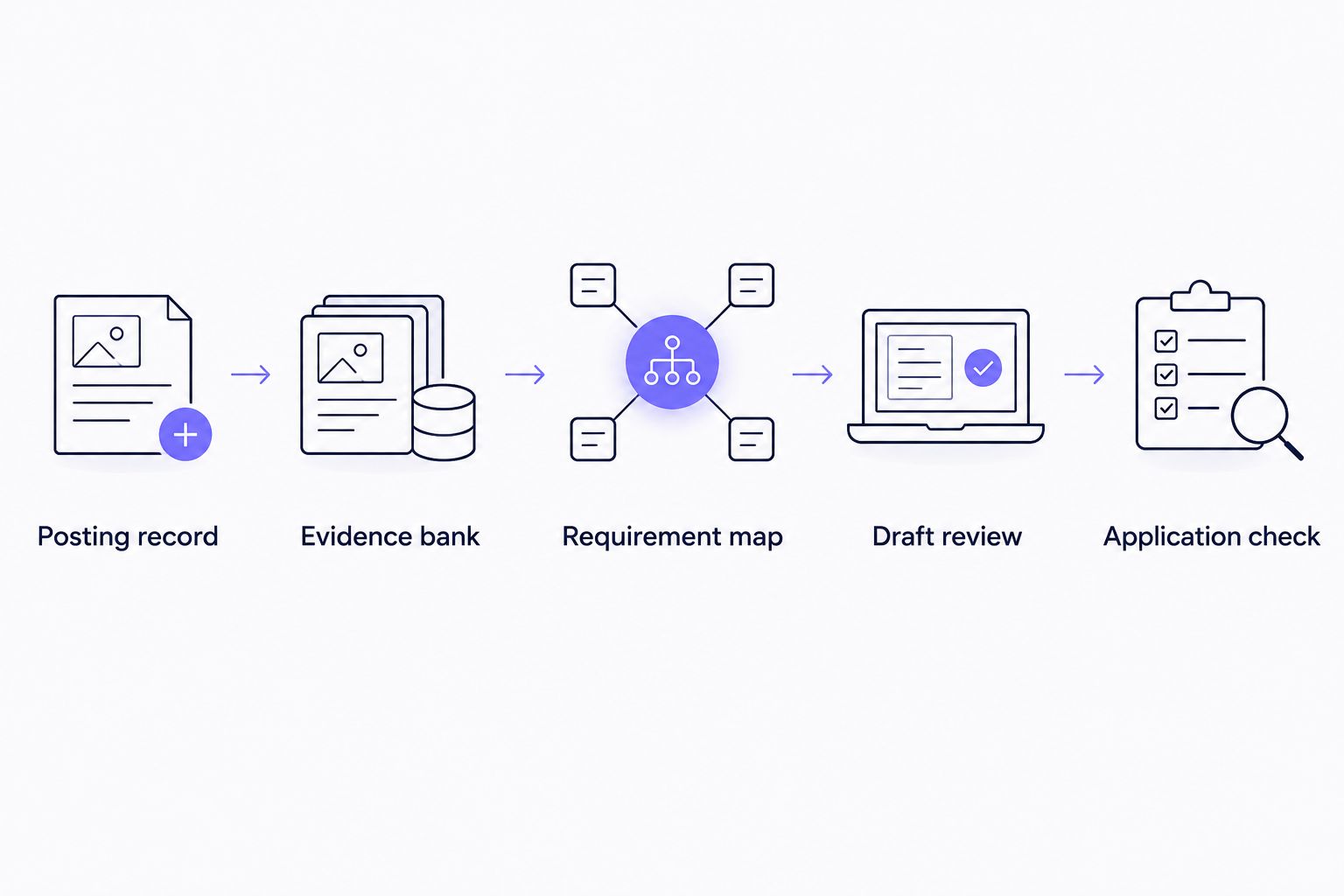
- Prepare a role-specific draft. With AmazApply, use résumé tailoring as a preparation step and inspect the resulting text yourself. Do not assume that a prepared application has been submitted.
- Add a working-document heading named Draft review. Compare the draft with the master résumé and evidence bank. Check every changed claim, especially language describing leadership, technical proficiency, scope, and results.
- Tighten the opening summary. State the relevant work you have done, not a list of qualities copied from the posting. Keep official experience titles unchanged even when the target role uses a different title.
- Review the document’s reading order. Use clear section headings and inspect the exported file for missing text, awkward page breaks, and content that becomes unclear outside the editor.
- Add an Application check heading to your notes. Confirm that the file belongs to the correct employer and role, then follow the file instructions on the live application. Review any populated fields and separate questions before submitting.
Expected result: You have a role-specific résumé whose claims match your evidence and whose contents you have checked in the application context.
A résumé is recruiter-ready when you can explain every claim and the relevant evidence is easy to find. That label is not an ATS certification or a hiring guarantee.
For version handling during a 2026 search, use a filename pattern such as Employer_Role_Resume_2026. Keep the master separate, and add a descriptive revision label when you make a meaningful change.
Choose the preparation route
Both routes below require the same final accuracy check. The difference is who prepares the first draft, not who owns the application’s claims.
| Preparation route | Best for | Benefit | Limitation |
|---|---|---|---|
| Manual tailoring | Job seekers who want to edit every sentence directly | You control selection and wording from the start | You perform the mapping, rewriting, and version handling yourself |
| AmazApply-assisted preparation | Individual job seekers who want tailored drafts to review | Prepares résumés, cover letters, and applications for approval | You still verify claims, answer application questions, and approve each application yourself |
Choose manual tailoring when direct editing is your preference. Choose assisted preparation when you want a draft to work from, while keeping the same evidence standards.
When the Greenhouse posting changes
Use a change-based workflow when the employer updates a posting or you revisit it later. Do not replace the entire résumé simply because the listing text has changed.
- Save a new posting record beside the original. Preserve the earlier version so you can identify what changed.
- Compare responsibilities, qualifications, location requirements, and application instructions. Separate substantive changes from rewording.
- Update only the affected rows in the requirement map. A newly requested skill remains a gap unless your evidence supports it.
- Revise the relevant résumé sections and repeat the draft review. If you already submitted an application, check the employer’s available instructions rather than assuming that a local file change updates it.
Expected result: Your revised document reflects the current posting without losing the history of what you prepared previously.
For a related preparation sequence, see tailoring your résumé when a new job match appears. Keep approval separate from drafting, regardless of what starts the workflow.
Troubleshooting
The draft includes experience you never had
Delete the unsupported claim and trace it back to the requirement map. Replace it with verified evidence or leave the requirement marked as a gap. Do not soften an invented claim with vague wording; remove the underlying assertion.
The résumé sounds like the posting
Replace copied responsibilities with descriptions of your own work. Retain accurate role terminology, but attach it to a concrete project, task, or responsibility. If a sentence could describe any applicant, it is not doing enough work.
Uploaded text differs from the document
Inspect the exported file and any application fields populated from it. Correct missing or misplaced content where the form permits editing. Follow the employer’s file instructions rather than assuming that a particular format works identically across applications.
The application asks for information absent from the résumé
Answer the question directly using your verified records. Do not insert eligibility claims, compensation information, or other application answers into the résumé merely because the form asks for them. Keep the document and form consistent without making them duplicates.
You cannot tell which draft you approved
Stop before submission and compare the file with your saved posting record. Rename the reviewed version clearly and move superseded drafts away from the upload location. During a 2026 search, distinguish the capture date from the revision date so neither gets mistaken for the other.
Customize your workflow
Extend the same evidence map to a cover letter rather than starting a separate story. Select relevant examples from the approved résumé, explain their connection to the role, and avoid adding achievements that never passed review.
For adjacent job titles, reuse the evidence bank but create a new requirement map. A shared source file is useful; a shared final résumé is not automatically appropriate. Different responsibilities call for different emphasis.
Keep a simple application log with the employer, role, posting capture date, reviewed filename, and submission status. Record submission only after you complete that action. A draft, an approval, and a submitted application are different states.
Pause preparation whenever the evidence is unclear. Resolve uncertain dates or ownership claims before producing another version; repeated rewriting does not make an unsupported statement accurate.
FAQ
What is greenhouse resume tailoring?
Greenhouse resume tailoring is adapting your résumé to a specific job posting hosted through Greenhouse. Match the employer’s requirements to verified experience, then review the document and application fields before submitting.
Can AmazApply prepare a résumé for a Greenhouse job posting?
AmazApply prepares tailored résumés and cover letters for individual job seekers to review. Use the posting and verified experience as source material, and keep preparation separate from submission; this workflow does not assume a direct Greenhouse integration.
Do I need a separate résumé for every Greenhouse application?
Review each posting separately, but revise only what its requirements justify. Keep a master résumé and save a distinct application version when you change the emphasis or wording.
Should I copy keywords directly from the job description?
Use the employer’s terminology only when it accurately describes your experience. A requested tool, credential, or responsibility does not belong in your résumé unless you can support it.
What file format should I upload to Greenhouse?
Follow the file instructions on the employer’s live application. Inspect the exported document and review any fields populated from the upload before submitting.
Will a tailored résumé guarantee an interview?
No tool or résumé workflow can promise an interview. Tailoring clarifies relevant evidence; it does not control employer decisions or other applicants’ qualifications.
What should I do if the posting changes after I draft my résumé?
Compare the updated posting with your saved version and revise the affected requirement-map entries. Review any resulting résumé changes, and do not assume that editing a local file changes an application already submitted.
One last thing
Before submitting in 2026, read only the sentences that changed from your master résumé. Each changed sentence deserves a direct question: can you explain what you did and support the wording?
That comparison is more useful than another cosmetic rewrite. If the wording exceeds the evidence, restore the accurate version—even when the stronger sentence sounds closer to the posting.