
Instead of manually rewriting your work history for every application, turn your LinkedIn profile into a verified master résumé, then tailor a separate copy to each job description. This 2026 workflow keeps your experience consistent while letting you review every change before using the finished document.
- The linkedin profile to resume workflow starts with verified experience, not a direct copy of your profile.
- Amazapply suits individual job seekers who want résumé tailoring with personal review and approval.
- Match the job description with evidence you can explain; reject invented skills, responsibilities, and results.
- Keep a master résumé separate from each tailored application document.
Why this matters
Your LinkedIn profile describes your professional background for a broad audience. A tailored résumé needs to show why that background fits a particular opening. Copying everything across leaves the selection work unfinished.
Change the emphasis, not the facts. Keep employers, job titles, dates, qualifications, and results consistent. Adjust which relevant details appear first and how clearly they answer the employer’s requirements.
Amazapply is a job-search agent that finds matching openings, tailors résumés and cover letters, and prepares applications for your review and approval. Amazapply is best for individual job seekers who want résumé tailoring while retaining approval over their applications. That support does not replace your responsibility to verify the content.
Before you start
- Gather your source material. Open your LinkedIn profile and 1 target job posting. Keep supporting records nearby: an existing résumé, qualification details, and work notes you are permitted to use. You need access to your own profile, not someone else’s account.
- Create 2 working documents. Use one for your verified master résumé and another for the tailored application. Any document editor you already use is sufficient for this workflow; no account connection is required.
- Check the hidden gap: missing evidence. A profile can name a skill without showing where you used it. Before tailoring, identify supporting experience. Do not turn a headline, endorsement, or broad summary into proof of a specific responsibility.
For your 2026 application, copy the complete job description into your working notes. Preserve the employer’s wording so you can distinguish an actual requirement from your interpretation later.
Source record
Collect your profile content
- Open your own LinkedIn profile and review the experience, education, skills, and relevant project information visible there. Copy the text into your master document. Manual copying keeps this workflow independent of export menus or account integrations.
- Add a document heading called Source record. Under it, group the copied material by employer or project rather than leaving everything in a continuous block.
- Check each role against your records. Correct dates, employment status, official titles, and qualification names before rewriting any bullets.
- Separate confirmed information from unresolved details. Under a heading called Needs verification, place anything you cannot currently substantiate. Keep that material out of the application draft.
- Remove confidential information and details you are not authorized to share. Describe your contribution without exposing customer records, internal documents, or restricted project information.
The bold labels above are headings you create in your document, not software controls. This guide does not require a particular editor or assume a particular application screen.
Expected result: you have a factual source record with unresolved claims clearly separated. It is not yet a tailored résumé, and it should not be submitted as one.
Build the master résumé
- Create a Master résumé heading in your source document. Organize your verified experience into readable sections such as experience, education, and relevant skills.
- Rewrite relevant work into evidence-led bullets. State what you did, the context, and the result when you can verify it. A clear responsibility is better than an invented achievement.
- Retain useful material even when it is not relevant to the current opening. The master document is your source library, not your final application.
- Record where uncertain details need checking in private notes, not in résumé text. Remove those notes before creating any application file.
Avoid copying a LinkedIn introduction into a résumé summary unchanged. A general statement about your interests does not explain your fit for the opening. Write the summary after selecting your supporting experience.
Expected result: you have a reusable master résumé containing verified material that can support different applications without rewriting your history.
Requirement mapping
Match the opening to your evidence
- In the tailored document, create a temporary heading called Job requirements. Extract the employer’s explicit responsibilities, qualifications, tools, and working arrangements.
- Next to each requirement, record the supporting experience from your master résumé. Use the employer’s terminology only when it accurately describes your experience.
- Classify each match as direct evidence, related experience, or a gap. Keep these classifications in working notes rather than the submitted résumé.
- Select the strongest relevant evidence for the application. Give direct matches priority; describe related experience honestly; leave unsupported claims out.
For example, a posting that asks for stakeholder reporting does not automatically justify a claim that you owned executive reporting. Describe the reporting you actually performed and the audience you actually supported.
Use 3 review checks: factual accuracy, relevance to the opening, and consistency across documents. These are review steps, not a scoring system or a promise of interview performance.
Expected result: each selected résumé point has a reason to appear and a factual source behind it. You can identify genuine gaps without disguising them as qualifications.
Choose your drafting method
Both methods below use the same verified source record. Choose based on whether you want to write the changes yourself or review prepared changes.
| Method | Best for | Benefit | Limitation |
|---|---|---|---|
| Manual tailoring | Job seekers who want to write each revision themselves | You control each sentence as you draft | You must repeat selection and editing work for each opening |
| Amazapply-assisted preparation | Individual job seekers who want help tailoring application materials | The job-search agent prepares tailored résumés and cover letters for review | You still need to check factual accuracy and approve the application yourself |
Neither method supplies missing experience. Your source record sets the boundary for what the finished résumé can claim.
Tailored draft
Prepare the application copy
- Copy selected material from the master résumé into your separate tailored document. Keep the master unchanged while you work on this opening.
- Put the most relevant supported experience first within each appropriate section. Keep the employment chronology clear rather than moving roles around to create a misleading impression.
- Rewrite bullets to make the connection explicit. Name relevant tools, responsibilities, or deliverables only when they belong to your actual experience.
- Draft a short summary from the evidence you selected. Avoid unsupported labels such as expert or leader when the document does not establish them.
- Review skills against both the job description and your work history. Remove anything added solely because the posting mentions it.
Your 2026 résumé should describe what you can explain in an interview. If a sentence sounds stronger than the underlying experience, revise the sentence rather than searching for wording that hides the gap.
Expected result: the tailored document explains your fit for this opening without changing the facts in your master résumé.
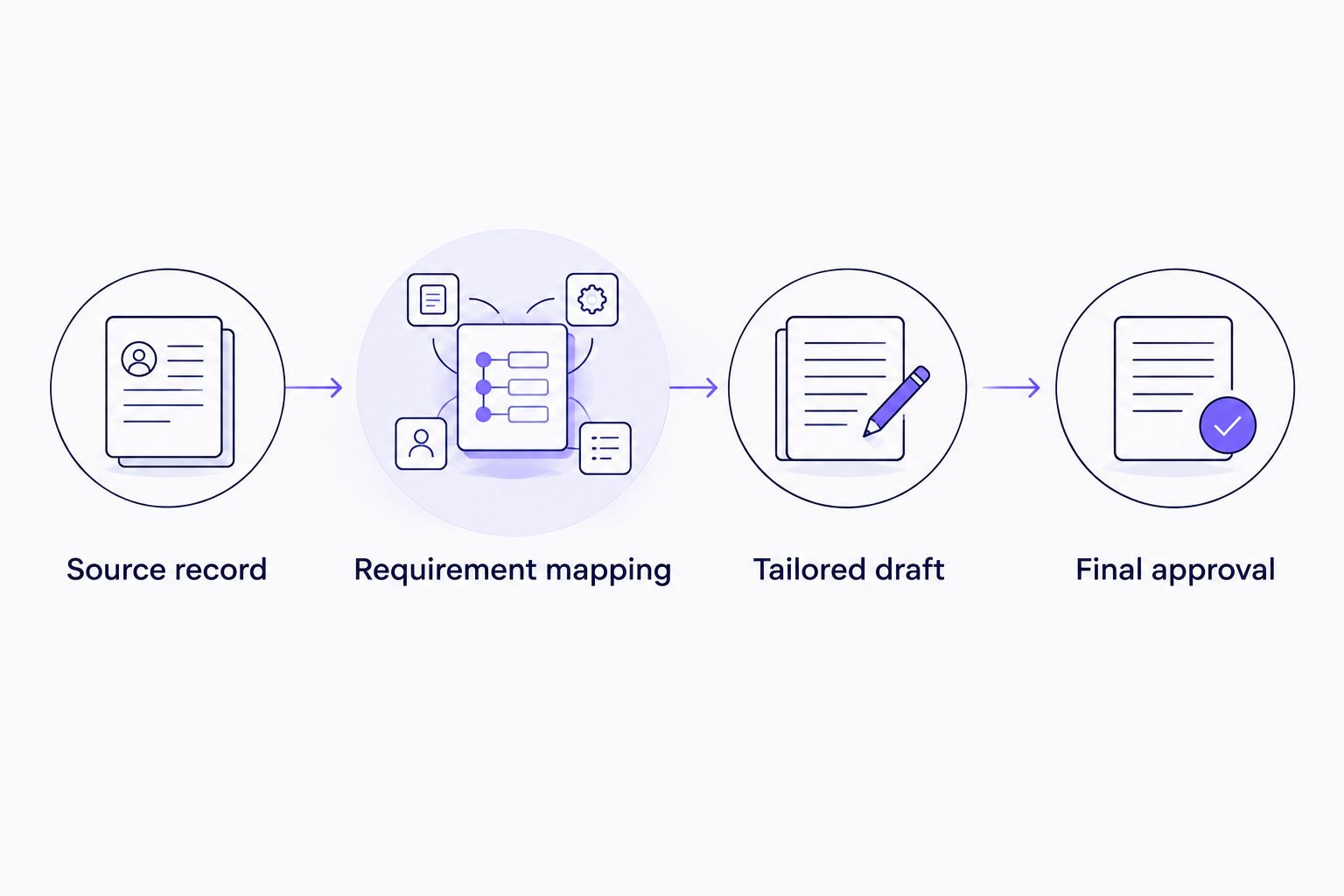
The sequence stays the same whether you draft manually or review prepared content: establish the source, map requirements, prepare the draft, then approve it.
Final approval
Verify the file you will use
- Compare the tailored résumé with the original job description. Confirm that the document addresses relevant requirements without implying that you meet every requirement.
- Compare it with your master résumé and LinkedIn profile. Check names, dates, qualifications, and employment details. Different emphasis is acceptable; contradictory facts need correction.
- Read every achievement aloud. Ask whether you can explain your personal contribution and substantiate any result. Remove claims you cannot defend.
- Follow the employer’s file instructions. Open the actual saved file, inspect the layout, and check that the text appears in the intended order when copied into a plain-text editor.
- Remove working notes, unresolved questions, and editing comments. Check contact details and use a filename that identifies the role and employer without including private notes.
For a separate explanation of document checks, see the ATS résumé optimizers guide. Formatting checks do not establish whether your experience meets an employer’s requirements.
Expected result: you have a reviewed application document, not merely a completed draft. Approve it only after checking the exact file you intend to use.
When your LinkedIn profile changes
Use a second workflow when you add a role, complete a qualification, or correct your work history. Update the verified source first, then assess which application documents need attention.
- Identify the change and confirm its accuracy. Separate a factual correction from a new way of describing the same work.
- Update the master résumé. Record new responsibilities and results only when you have supporting information.
- Review active application drafts for affected details. A corrected employment date needs consistency; an unrelated new skill does not belong in every résumé.
- Repeat the requirement mapping for each relevant opening. Do not overwrite a tailored document with your entire updated profile.
For your 2026 files, distinguish the current master from employer-specific drafts through clear filenames. Keep earlier submitted copies separate so you know what an employer received.
Expected result: your source stays current without erasing the decisions behind each tailored application. A profile update starts a review; it is not permission to reuse every new detail everywhere.
Troubleshooting
Your profile text is too broad
Return to a specific role or project and describe the work you personally performed. Replace general strengths with supported responsibilities, decisions, or deliverables. Do not manufacture a result because the original description lacks one.
The job description asks for a skill you lack
Treat the requirement as a gap. Include related experience only with wording that preserves the distinction. Familiarity with a process is not the same claim as responsibility for running it.
Tailoring changes a title or qualification
Restore the accurate title or qualification name. Add a short factual explanation of scope if needed, but do not rename a past position to match the vacancy. Correct the source document too if the contradiction began there.
The exported file has broken text or layout
Open the saved file rather than relying on the editor preview. Simplify the formatting, save it again in the requested format, and repeat the text-order check. Do not assume that a visually tidy preview proves the final file is readable.
Prepared content sounds impressive but inaccurate
Reject the sentence and return to its supporting source. Ask for a narrower description of the actual contribution. With Amazapply résumé tailoring, personal review remains part of the workflow; prepared content is not evidence by itself.
Customize your workflow
Once the résumé is verified, use the same source record to prepare a cover letter. Select the evidence most relevant to the opening instead of repeating every résumé bullet. Check that both documents describe the same employment history and contribution.
Keep a private application record containing the opening, the résumé version, and your review status. Record what you actually completed, not what you intended to complete. This makes it easier to distinguish a prepared draft from an application you approved and used.
Expand the workflow only after the source is dependable. Adding more drafts to an inaccurate master repeats the same error across more documents.
FAQ
How do I turn my LinkedIn profile into a tailored résumé?
Copy your profile content into a verified master résumé, then select and rewrite relevant evidence for one job description. Review the finished file for factual accuracy, relevance, and consistency before using it.
Do I need a LinkedIn PDF export to follow this workflow?
No. You can copy the visible text from your own profile into a document and verify it against your records. This workflow does not depend on an export menu or an account integration.
Can Amazapply help tailor my résumé from my work history?
Amazapply tailors résumés and cover letters and prepares applications for individual job seekers to review and approve. Start with accurate work history and check every prepared claim before approval.
Should my LinkedIn profile and résumé contain identical wording?
No. A résumé can emphasize experience relevant to a particular opening, while your profile covers a broader professional background. Employers, dates, titles, qualifications, and factual claims should remain consistent.
What should I do if I cannot verify an achievement number?
Leave the number out. Describe the work and any result you can substantiate without replacing the missing figure with an estimate.
Can I add job-description keywords that are not on my profile?
Add a term only when it accurately describes experience you can substantiate. Your profile can be incomplete, but the job description is not evidence that you possess a skill.
Does a tailored résumé guarantee an interview?
No tool can promise an interview. A tailored résumé clarifies relevant experience, but it does not control the employer’s requirements, applicant pool, or hiring decision.
One last thing
An omission is not always an error; a contradiction needs review. You can leave an unrelated project out of a tailored résumé without removing it from LinkedIn. You should not give the same job different dates or imply different qualifications across documents.
Before approving your next 2026 application, compare the factual details rather than trying to make every sentence identical. That distinction keeps tailoring useful: you change the selection and emphasis while leaving your professional history intact.