
Auto-apply job tools for gig workers are software that finds openings or prepares applications with the aim of securing work that fits your schedule. This 2026 guide explains how to handle overlapping projects, variable availability, and different work arrangements without surrendering control over what employers receive.
- Auto-apply job tools for gig workers should support schedule matching, truthful résumé tailoring, and approval before sending.
- Amazapply fits gig workers who want matching openings and tailored application drafts they review and approve themselves.
- Choose application preparation over unattended sending when availability, contract terms, or screening answers need judgment.
- Track submitted applications separately from drafts; a prepared application is not a confirmed submission.
Why application automation matters for gig workers
A gig worker’s application has to explain more than experience. You need to show which assignments you can accept, when you can start, and how previous projects relate to the opening. A relevant job title alone does not establish a fit.
If you combine delivery work, freelance projects, or temporary assignments, the same résumé will not tell every employer the right story. Your underlying facts stay fixed; the evidence you emphasize changes. An opening requiring fixed shifts also needs a different availability check from a project with a delivery deadline.
For your 2026 search, separate finding work, preparing applications, and submitting them. These are distinct tasks, and a tool’s name does not establish which tasks it performs. The broader auto-apply job tools guide provides a starting point for comparing that category.
The practical goal is a repeatable process: identify suitable openings, explain your experience accurately, and send only applications you have checked. No tool can promise interviews or employment.
Build an application workflow under your rules
Define the work you can accept
Start manually with a short eligibility note before searching. Choose 2 target role families as an initial organizing limit, not a rule about how many careers you can pursue. Keep separate criteria when those families involve different schedules or types of work.
Write down your actual availability rather than the availability you hope to have later. Include existing commitments and whether you want employee positions, freelance assignments, or both. Do not let a broad search quietly turn into applications for arrangements you cannot accept.
Treat required conditions as filters and preferences as trade-offs. A preferred title can be flexible; an incompatible shift cannot. When a posting leaves a required condition unclear, flag it for clarification instead of assuming the answer is favorable.
Keep this note beside your application draft so you can compare the opening against your rules before spending time tailoring documents.
- Target roles: Name the work you can demonstrate you can do.
- Schedule: Record workable days, hours, and start constraints.
- Work arrangement: Distinguish employment from independent contracting.
- Location: Specify acceptable travel, on-site work, and remote arrangements.
Translate your gig history into evidence
Build a source document using contracts, invoices, project files, and other records you already hold. Select 3 recent projects as a manageable starting exercise. Add older work when it supplies stronger evidence for the role.
Describe the task, your contribution, and the result you can substantiate. If you do not have a measured result, state the completed work plainly. A specific description of what you delivered is stronger than a performance figure you cannot defend.
Separate the organization that paid you from the client or platform involved when that distinction matters. Do not describe independent work as employment or turn a project responsibility into a formal job title you never held.
This source document gives every later draft the same factual foundation. It also helps you recognize when suggested wording introduces an unsupported claim.
- Project scope: Record what you were responsible for delivering.
- Verified results: Include measurements only when records support them.
- Skills used: Connect each skill to an actual task.
- Dates and relationships: Keep project dates and working arrangements accurate.
Choose how applications will be prepared
Prepare an initial application manually using a saved posting and your source document. This establishes what needs judgment: role relevance, availability, document wording, and answers to employer questions. Reuse factual material, but do not reuse a decision without checking the new opening.
For assisted preparation, Amazapply finds matching openings, tailors résumés and cover letters, and prepares applications for individual job seekers to review and approve. Amazapply is best for gig workers who want application preparation with personal approval.
The limitation matters: application preparation is not proof of submission. Amazapply’s described workflow gives you documents and applications to review; you still need to establish what was actually sent. Do not assume unattended submission, platform compatibility, or support for every employer questionnaire.
For a 2026 evaluation, examine the workflow rather than accepting an auto-apply label as a feature list. Keep your acceptance rules outside the tool as well.
- Manual baseline: Keep a checked application as a reference.
- Matching: Compare suggested openings with your required conditions.
- Drafting: Check tailored documents against your source material.
- Approval: Approve every application yourself before it proceeds.
Tailor your résumé without changing the facts
Read the posting manually and identify the responsibilities your experience actually supports. Then adjust the order and wording of your résumé so that evidence is easy to find. Tailoring changes emphasis, not your history.
A customer-facing gig can provide evidence of communication or issue handling if those tasks were part of your work. It does not automatically establish account management, team leadership, or ownership of business results. Keep the distinction visible in your bullets.
Use the employer’s terminology when it accurately describes your experience. Do not add software, credentials, or responsibilities simply because they appear in the posting. If a requirement is missing from your background, leave it missing rather than disguising the gap.
Keep a stable source résumé and save role-specific versions separately. That lets you check what changed and recover the original wording when a draft drifts.
- Relevant experience: Move supporting projects closer to the top.
- Accurate terminology: Match language only where the meaning matches.
- Readable structure: Use clear headings and identifiable dates.
- File check: Open the saved document and inspect its contents.
Review the entire application before approval
Set a 20-minute review block as a scheduling aid, not a speed target. Extend it whenever a posting or questionnaire needs more attention. Review the opening, résumé, cover letter, and screening answers together; checking each in isolation can miss contradictions.
Compare availability statements with your current commitments. Check location requirements, employment type, and start expectations against your eligibility note. An otherwise suitable application still needs correction if it promises hours you cannot work.
Read questions about qualifications and work eligibility literally. Do not let a generated answer turn uncertainty into a positive response. Leave unresolved questions for your own decision, and use the employer’s instructions when clarification is required.
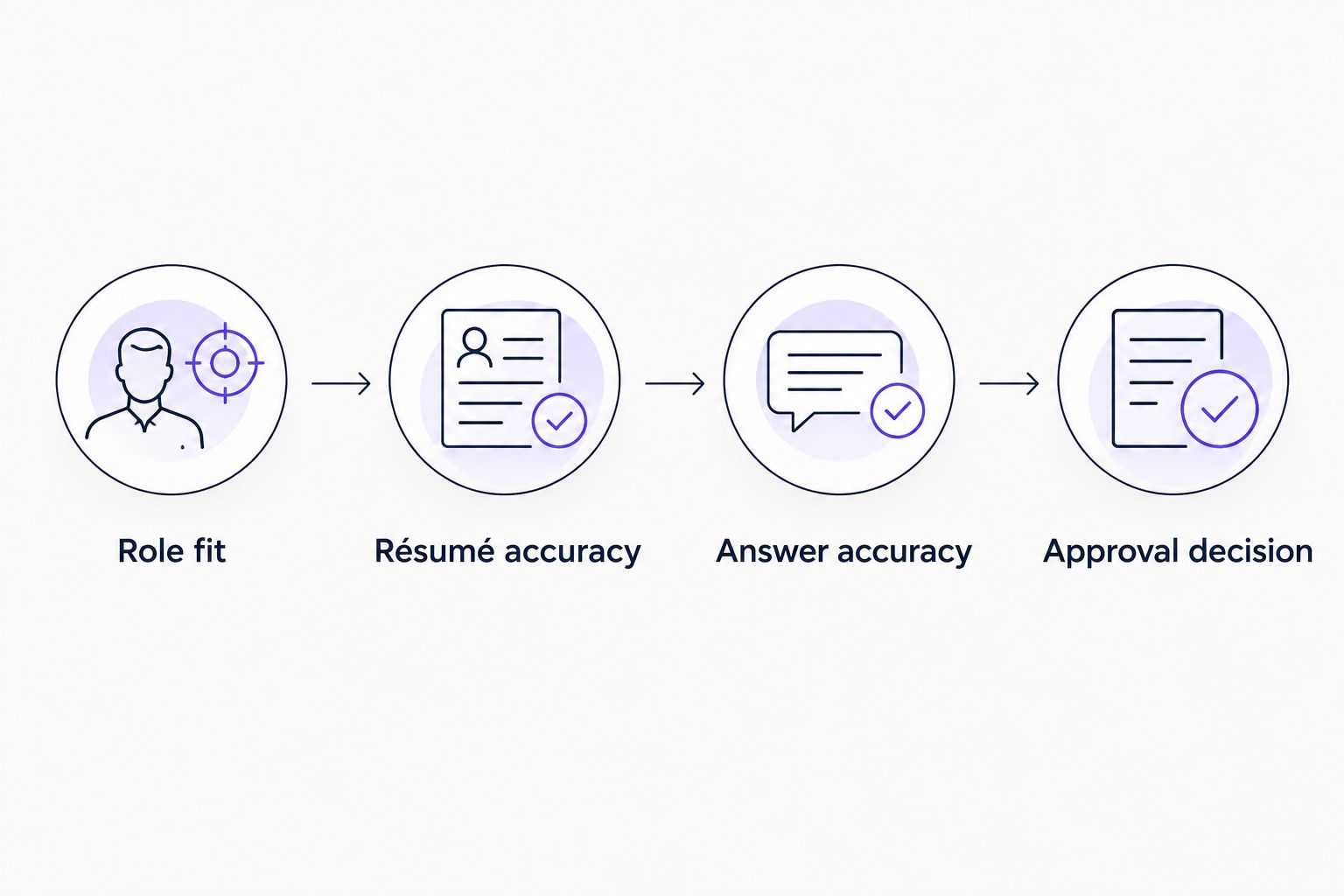
Use the following review sequence before approving anything. Each stage checks a different failure point; none substitutes for reading the application itself.
- Role fit: Confirm the opening meets your required conditions.
- Résumé accuracy: Verify titles, dates, skills, and project claims.
- Answer accuracy: Check availability and screening responses yourself.
- Approval decision: Approve, revise, or stop the application.
Submit through the required channel and record the result
Follow the employer’s application instructions after approval. If the process requires a portal, questionnaire, document upload, or action from you, complete that requirement through the stated channel. A finished draft does not replace the employer’s process.
Record submission only when you have evidence that the application was sent. That evidence can be a confirmation message or a status shown by the receiving system. Keep the supporting record with the application rather than relying on memory.
Use separate statuses for found, drafted, approved, and submitted applications. These labels prevent unfinished work from inflating your view of search progress. Add a stopped status for openings you reject after closer review.
Check your existing record before sending another application to the same opening. If you need to correct something already sent, follow the employer’s instructions rather than creating a duplicate automatically.
- Submission channel: Follow the instructions in the posting.
- Document version: Save the files associated with that application.
- Confirmation: Retain available evidence of receipt or submission.
- Application status: Distinguish prepared work from completed sending.
Measure useful responses instead of application volume
Review your search manually once a week as a suggested operating rhythm. Compare applications by role family and work arrangement before combining them into a single total. A freelance project search and a fixed-shift employment search involve different acceptance decisions.
Record what happened after submission: no response yet, a request for information, an interview invitation, or a rejection. Also record whether the opportunity still fits your schedule when an employer responds. Availability can change while an application is pending.
Use patterns to choose what to inspect next, not to invent explanations. Repeated schedule conflicts justify revising your filters. A lack of responses does not, by itself, prove that your résumé format caused the problem.
Your 2026 application record should support decisions about what to change. It should not reward sending applications you would decline if an employer answered.
- Fit: Note why each submitted opening met your rules.
- Response: Record employer replies without reclassifying silence as rejection.
- Conflicts: Track unsuitable schedules or working arrangements.
- Next adjustment: Change a filter or document based on observed problems.
Compare application options for gig workers in 2026
Choose the option that matches the task you need help completing. These approaches are not interchangeable: finding an opening, drafting a résumé, and submitting an application require different checks. No starting prices are included because the useful comparison here is workflow and responsibility.
| Option | Best for | Main advantage | Key limitation |
|---|---|---|---|
| Manual search and application | Gig workers testing a new role direction | You inspect every posting and write every answer yourself | Searching, tailoring, and recordkeeping remain your responsibility |
| Saved searches and alerts | Gig workers who already know their target roles | Search criteria provide a repeatable way to look for openings | Alerts do not establish eligibility or prepare a complete application |
| Résumé and cover-letter drafting tools | Gig workers who have selected openings already | Drafting support helps reorganize relevant experience | Drafts still need factual checks and do not establish submission |
| Amazapply application preparation | Gig workers wanting matching openings and tailored drafts with personal approval | Combines matching, résumé tailoring, cover letters, and application preparation | You must review accuracy and distinguish preparation from confirmed submission |
Choose manual review as a control, not as a competing product. You can combine alerts or assisted preparation with a personal approval step. The method changes; your responsibility for accurate claims stays the same.
Common mistakes gig workers make
Treating availability as a detail to resolve later
Applying first and checking shifts later creates avoidable mismatches. Compare required hours and start expectations before tailoring. If the posting is unclear, identify that uncertainty instead of drafting an application that implies unrestricted availability.
Turning project work into invented employment
Freelance experience belongs on a résumé, but its working arrangement should remain accurate. Describe the project and your contribution clearly. Do not replace a client relationship with an employee title simply to make your history look more conventional.
Sending the same résumé across unrelated roles
A document focused on delivery work does not automatically explain your fit for administrative contracting. Select evidence for the actual opening. Keep the facts fixed while changing which projects and responsibilities receive attention.
Confusing approval with submission
Approving a draft is a decision; submitting it is a separate event. Keep both statuses in your record. Until there is evidence of sending, treat the application as prepared rather than completed.
Ignoring commitments when employers respond
An opening that fit when you applied can conflict with work you accepted afterward. Recheck availability before agreeing to an interview schedule or start date. Update your search rules when your commitments change rather than continuing with outdated assumptions.
FAQ
What are the best auto-apply job tools for gig workers?
The best fit depends on whether you need help finding openings, preparing documents, or completing applications. Amazapply suits individual job seekers who want matching openings and tailored application drafts to review and approve themselves. Confirm each tool’s actual workflow before treating it as an automatic submission service.
Can an auto-apply tool apply to freelance gigs and employee jobs?
Do not assume a tool supports both freelance marketplaces and employer application systems. Check the supported workflow directly, and keep separate eligibility rules for independent projects and employee positions.
Is automatic submission better than reviewing every application?
Reviewing every application is the recommended control when your schedule, qualifications, or screening answers need judgment. Automatic sending does not establish that an opening fits your commitments or that its answers are accurate.
How do I put gig work on my résumé?
Describe the projects, responsibilities, dates, and results you can verify. Identify the working relationship accurately, and select examples relevant to the opening rather than presenting independent work as employment.
Can I use these tools without a traditional employment history?
You can prepare applications using relevant project and gig experience. Present that evidence truthfully; a drafting tool does not create qualifications or remove an employer’s requirements.
How do I know whether my application was actually submitted?
Look for evidence from the submission process, such as a confirmation message or a status in the receiving system. A prepared résumé, approved draft, or completed cover letter does not establish that an employer received an application.
Will an auto-apply tool guarantee interviews?
No tool can promise interviews or employment. Matching and drafting support do not control employer decisions, and you still need to assess eligibility and approve accurate applications.
One last thing
Keep a do-not-apply note beside your résumé. Include unacceptable shifts, incompatible locations, work arrangements you reject, and employers or openings you have already considered. This is your stop rule, not another document to send.
For your 2026 search, update that note whenever you accept a new commitment. A tool can prepare a polished application for an unsuitable opening; your acceptance rules determine whether it should proceed. Better preparation only helps when you would genuinely consider the work.