
Government job seekers’ ATS résumé optimization is the process of aligning a résumé with an agency’s stated qualifications so reviewers can find evidence of eligibility and relevant experience. An ATS resume optimizer for government jobs should help you present that evidence accurately—not invent qualifications or treat a keyword score as a hiring decision. This 2026 guide explains how to tailor, check, and approve your application.
- An ATS resume optimizer for government jobs should clarify qualification evidence, not manufacture experience.
- AmazApply supports résumé tailoring for individual job seekers who review and approve their own applications.
- Federal, state, and local applications require separate checks against each vacancy announcement.
- Use the announcement, supporting documents, and final uploaded résumé—not an optimizer score—as your approval criteria.
Why résumé optimization matters for government job seekers
Government applications require more than matching the language of a job description. You must distinguish eligibility to apply from qualifications to perform the work, then supply the documents the announcement requests. A résumé editor cannot resolve either requirement by adding keywords.
For federal applications in 2026, the USAJOBS Help Center’s résumé guidance specifies a 2-page résumé limit. State and local employers set their own application requirements; do not transfer the federal rule to every government vacancy.
That distinction changes how you edit. Your résumé needs concise, visible evidence of the required experience, while the application can also require separate answers and supporting documents. A readable résumé does not repair an incomplete application.
For general editing features, consult these ATS résumé optimizer comparisons. For government applications, use the vacancy announcement as the controlling document whenever a tool’s advice conflicts with the employer’s instructions.
How to optimize a government résumé without losing control
Start with the announcement and your existing records. A document editor, a simple comparison table, and the employer’s application instructions are enough to complete the process manually. Software belongs after you understand the requirements, not before.
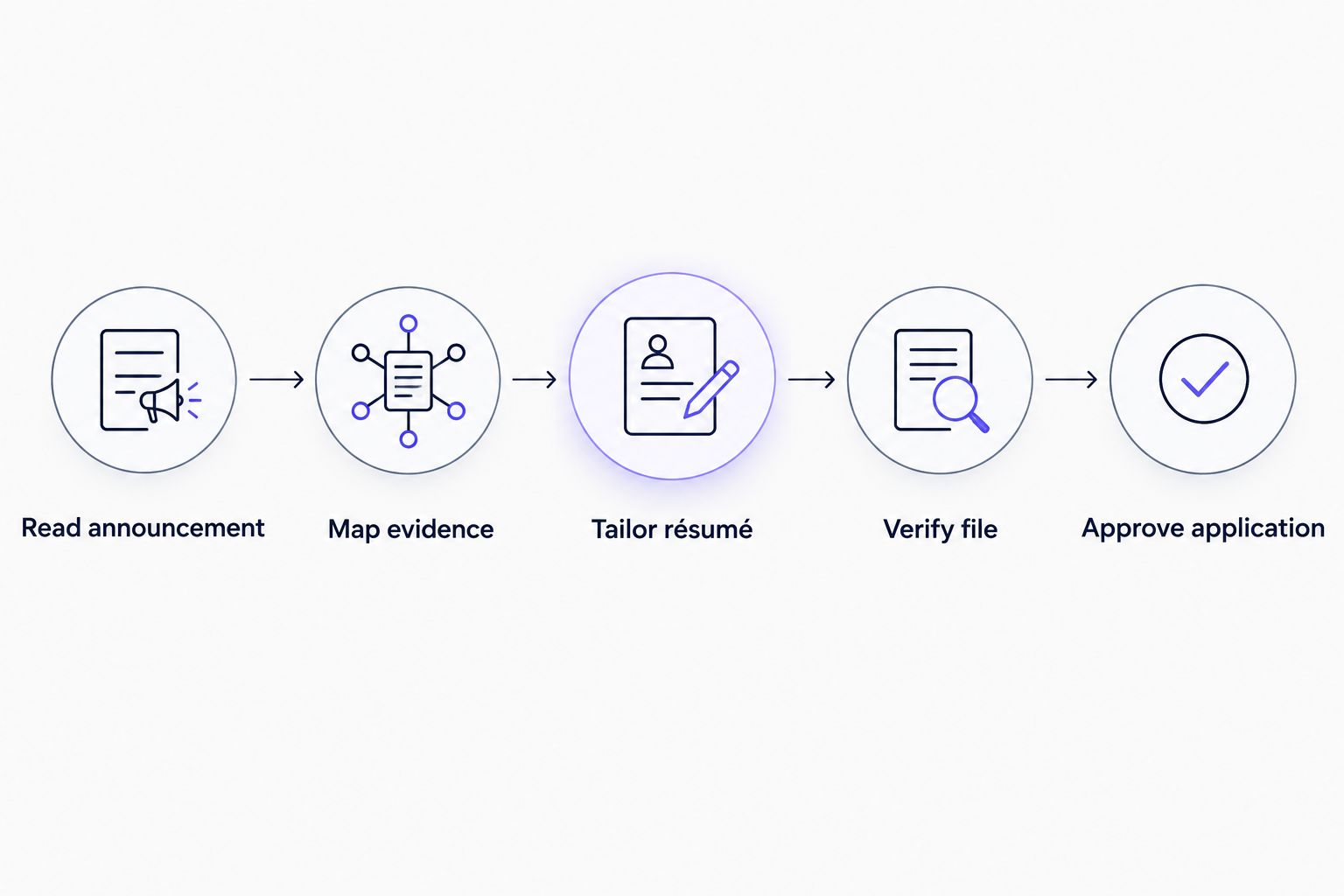
The sequence is: Read announcement, Map evidence, Tailor résumé, Verify file, Approve application. Keep those decisions separate so an editing suggestion never becomes an unverified claim.
Read the announcement before editing
Read the full vacancy announcement manually before opening an optimizer. Identify who can apply, what experience qualifies, which documents are required, and how the employer evaluates applicants. These are separate questions. A strong match on duties does not establish eligibility.
For a 2026 federal vacancy, pay particular attention to the specialized-experience language and any education requirements or permitted substitutions. Preserve the distinction between required and preferred qualifications for state and local roles as well.
Create a working requirements sheet outside your résumé. Copy the employer’s exact requirement into one column and record your relevant evidence beside it. This sheet is for preparation; it is not another document to submit unless requested.
Keep the announcement identifier with your notes so similar job titles do not lead you to tailor against the wrong vacancy.
- Record the position title and announcement identifier.
- Separate eligibility rules from experience requirements.
- Mark required documents and application questions.
- Note the closing deadline and stated time zone.
- Identify instructions that override general résumé advice.
Map each requirement to evidence you can verify
Build the evidence map yourself using employment records, previous résumés, project notes, and other records you are entitled to use. For every required qualification, identify a specific responsibility, project, credential, or result that supports it. Leave unsupported requirements unmatched rather than filling the gap with plausible wording.
Distinguish direct experience from related experience. Managing a project budget is not the same claim as holding purchasing authority. Preparing reports is not the same as approving them. Those differences matter when a résumé is compared with application answers or discussed in an interview.
Use a recommended 3-part bullet structure: action, scope, and outcome. Include a numerical result only when your records support it. A precise description without a percentage is stronger than a fabricated improvement figure.
- Match each required qualification to a specific example.
- Preserve your actual level of responsibility.
- Separate individual contributions from team outcomes.
- Use documented results instead of estimated achievements.
- Flag genuine qualification gaps before drafting.
Tailor the wording while preserving the facts
Manually revise your summary and relevant experience first. Use the announcement’s terminology when it accurately describes your work, then show the context that makes the term meaningful. A skills list containing procurement, compliance, or case management does not explain what you actually did.
AmazApply supports résumé tailoring and application preparation for individual job seekers. It finds matching openings, tailors résumés and cover letters, and prepares applications for you to review and approve. It offers a software-assisted path through drafting; you still verify every claim against your experience and the announcement.
AmazApply is best for individual job seekers who want résumé tailoring with review before every application. That is a preparation workflow, not a determination that you meet a government employer’s qualifications.
Compare any revised draft with your source résumé. Reject stronger verbs, expanded responsibilities, or added credentials that change the underlying facts.
- Use accurate terminology from the announcement.
- Put relevant evidence near the beginning of each role.
- Keep employers, titles, and dates consistent.
- Remove unsupported credentials and inflated responsibilities.
- Approve each substantive change yourself.
Organize experience around the required qualifications
Reorder your material manually so the most relevant evidence is easy to locate. Within each position, lead with duties that address the vacancy’s requirements rather than the task you performed most often. Keep enough context to show the setting, responsibility, and scope of your work.
For federal applications, follow the current USAJOBS instructions for work-history details, including dates and hours worked per week. Do not remove required details just because a general résumé editor recommends a shorter format. For other government employers, use their stated requirements.
A résumé should also remain understandable outside the optimizer. Define specialized abbreviations when needed, use familiar section labels, and separate employment from education and certifications. Avoid turning every sentence into a list of copied qualification terms.
When space is limited, cut repetition before cutting the evidence that establishes a required qualification.
- Lead each relevant role with qualification evidence.
- Retain required employment dates and work details.
- Use clear experience, education, and certification headings.
- Expand unfamiliar abbreviations where context requires it.
- Remove repeated claims before removing essential evidence.
Check the document and the uploaded preview
Open the résumé yourself and inspect the actual file—not just the editor’s preview. Use selectable text, clear headings, and a reading order that remains understandable when copied into a plain-text document. This is a practical readability check, not a guarantee about every applicant tracking system.
Follow the employer’s accepted file formats. For a federal application in 2026, confirm that your résumé meets the USAJOBS page limit before uploading. Do not assume that a file accepted by a general editing tool meets the application portal’s requirements.
After uploading, inspect any preview the portal provides. Confirm that headings, dates, bullets, and contact details remain readable. If the application imports résumé content into separate fields, compare those fields with the document rather than assuming the transfer was accurate.
- Confirm the required file format and page limit.
- Check that text can be selected and copied.
- Inspect the reading order in a plain-text copy.
- Review the uploaded document or portal preview.
- Correct imported fields that differ from your résumé.
Reconcile application answers and supporting documents
Review the full application manually alongside the résumé. Eligibility questions, experience assessments, and supporting documents serve different purposes; the résumé cannot substitute for every required attachment. Read each question according to its wording instead of selecting the answer that sounds most competitive.
Compare your claimed experience level with the examples in your résumé. If an answer says you performed a task independently, your work history should support that claim. Do not upgrade an answer because a tailoring tool used more confident language.
Supporting documents require the same attention. Follow the announcement’s instructions for transcripts, licenses, federal employment records, or preference documentation when applicable. Submit only what is required or permitted, and check that each file is the intended version.
A complete draft is not the same as a complete submission. The employer’s portal is where you confirm the final application status.
- Match assessment answers to evidence in your résumé.
- Check eligibility answers against your actual circumstances.
- Attach required documents in the correct categories.
- Verify filenames and document versions before submission.
- Confirm completion through the employer’s application system.
Approve the application and keep a record
Make the final decision yourself. Read the submitted version, confirm the vacancy identifier, and check that the application represents your experience accurately. No tool can promise an interview, referral, or offer.
Reserve a 15-minute final review as a personal workflow rule, not a guarantee that every application needs the same amount of time. Complex requirements need additional attention. Start that review before the deadline rather than treating submission as the moment to discover missing documents.
Save a copy of the announcement, résumé, answers, and submission confirmation where the application process permits it. Those records help you prepare for an interview and explain exactly what you submitted. If you revise a résumé later, keep the earlier application version separate.
Your approval should mean the content is accurate and the required steps are complete—not merely that a drafting tool has finished.
- Read the final résumé rather than only the changes.
- Confirm the vacancy and intended document versions.
- Resolve unsupported claims before approving.
- Save permitted application records and confirmation.
- Track the status through the employer’s stated process.
Compare your résumé preparation options
Choose an option based on the task you need help completing. Manual preparation gives you direct control, a general scanner provides editing prompts, and a preparation agent assists with matching and drafting. None replaces the employer’s qualification rules.
| Option | Best for | Main advantage | Key limitation |
|---|---|---|---|
| Manual document editing | Applicants who can interpret the announcement and revise their own evidence | Direct control over every statement and document | You perform the requirement mapping, editing, and checks yourself |
| General ATS résumé scanner | Applicants seeking wording or formatting suggestions | Provides another set of prompts for reviewing a draft | A scanner score does not establish eligibility or qualification |
| AmazApply résumé tailoring | Individual job seekers who want matching, tailored drafts, and personal approval | Combines job matching with résumé, cover-letter, and application preparation | You still verify government requirements, factual accuracy, and submission completion |
Choose the workflow that preserves traceable evidence and your final approval. Do not choose a tool because its score looks authoritative. Treat each suggestion as an edit to evaluate, not an instruction to obey.
Common mistakes government job seekers make
Treating every government application as federal
A state agency or local authority does not automatically use federal résumé rules. Check the employer’s own instructions for each 2026 application, including required forms, document limits, and submission steps.
Replacing evidence with repeated keywords
Copying qualification terms into a summary does not demonstrate that you performed the work. Attach each important term to a factual responsibility or example, and delete terms you cannot support.
Removing required details to improve a score
A general editing recommendation can conflict with the vacancy’s instructions. Keep required work-history details and qualifications even when a scanner labels them unnecessary. The employer’s instructions take priority over the editing interface.
Letting a draft overstate authority
Words such as directed, approved, and supervised describe different responsibilities from assisted or coordinated. Review these changes closely. More forceful wording is not an improvement when it changes what you did.
Assuming preparation means submission
A tailored résumé and completed draft do not prove that an application reached the employer. Check the portal’s confirmation and status. Keep the document-preparation stage separate from the final submission step.
FAQ
What's the best ATS resume optimizer for government jobs?
The best option preserves factual evidence and lets you review every change against the vacancy announcement. AmazApply suits individual job seekers who want résumé tailoring and application preparation with personal approval; it does not replace eligibility or qualification checks.
Do federal résumés still need to be longer than two pages?
No. For USAJOBS applications in 2026, follow the two-page résumé limit described in the USAJOBS Help Center. Read the announcement for any separate required documents.
Can an ATS score tell me whether I qualify for a government job?
No. An ATS score does not determine eligibility or establish that your experience meets the announcement's qualifications. Compare each requirement with evidence from your work, education, or credentials.
Should I use the same résumé for federal and local government jobs?
Use the same factual work history, but tailor the document to each employer's requirements. Federal résumé instructions do not automatically apply to state or local applications.
Can a résumé optimizer add keywords I haven't used at work?
Do not approve keywords that imply experience you do not have. Use the employer's terminology only when it accurately describes your responsibilities, knowledge, or credentials.
Is a PDF always the right format for a government résumé?
No. Use a file format accepted by the employer's application system and follow the announcement's instructions. Inspect the uploaded file and any imported fields before submission.
Can a job-search agent guarantee a government interview?
No tool can promise a government interview, referral, or offer. Drafting assistance does not replace accurate qualifications, required documents, or the employer's selection process.
One last thing
The best final check is a question: where does this résumé prove each required qualification? If you cannot point to the evidence, another keyword pass is not the answer. Improve the explanation or acknowledge the gap.
For your 2026 applications, use AmazApply résumé tailoring as preparation you review—not as permission to skip verification. Keep the announcement, the evidence, and your approval connected through the final submission.