
Nonprofit professionals’ AI job search tools are software that finds relevant openings and prepares application materials to help you pursue roles aligned with your experience and mission priorities. This 2026 guide explains how to compare options, document your impact, and keep every application under your control.
- AI job search tools for nonprofit professionals work best with verified experience, mission criteria, and human approval.
- AmazApply fits job seekers who want role matching, résumé tailoring, and application preparation while retaining approval.
- Use résumé tailoring to clarify relevant experience, not invent fundraising results, grant ownership, or program outcomes.
- Compare manual tracking, writing assistants, and application-preparation software by the work you need help completing.
Why AI job search tools matter for nonprofit professionals
A nonprofit application needs more than a relevant title. You need to show how your responsibilities connect to the organization’s work without treating enthusiasm for its mission as proof that you can do the job.
A development role can involve donor relationships, grant writing, fundraising operations, or different combinations of those responsibilities. Program and operations titles also need careful reading. Match the responsibilities before matching the title.
For your 2026 search, separate discovery from evidence: first identify suitable openings, then decide which experience supports each application. The guide to AI tools for résumé tailoring provides a related comparison for that second task.
Tools help organize this work, but they cannot establish facts that your records do not support. You remain responsible for checking eligibility, interpreting the role, and deciding whether the employer’s stated mission matches your own boundaries.
Build a nonprofit job-search process you control
Define your mission and role boundaries
Start manually with a document or spreadsheet. Write down the work you want to do, the causes you want to support, and the conditions you need before asking software to suggest openings.
Choose 3 role families as an initial search exercise, such as development, program management, and operations. Narrow them using responsibilities from actual descriptions rather than assuming that similar titles mean similar jobs. This gives you a basis for accepting or rejecting a suggested match.
Keep preferences separate from requirements. A preferred cause area does not have the same status as a work-authorization requirement or an essential professional credential. In your 2026 search plan, make that distinction visible so an appealing mission does not obscure a practical mismatch.
Finish this step with a written decision rule, not a loose collection of interests:
- Role families: Name the functions you can support with experience.
- Mission boundaries: Record causes you want to support or exclude.
- Working conditions: Specify location, travel, and schedule requirements.
- Eligibility requirements: List credentials and authorization conditions to check.
- Decision rule: State what makes an opening worth a closer review.
Build an evidence bank before drafting
Create a private source document containing responsibilities, projects, tools, and results you can verify. Use your existing résumé, performance records, and nonconfidential work samples; do not begin by asking a writing assistant to generate impressive achievements.
Distinguish your contribution from the organization’s outcome. Supporting a grant application is not the same as securing the award. Maintaining donor records is not the same as owning the fundraising strategy. Precise attribution makes your experience easier to explain in an interview.
Record a result only when you can substantiate it and are permitted to share it. Otherwise, describe the scope, action, and deliverable without adding a figure. A clear account of a reporting process is more useful than an invented efficiency gain.
Build entries that remain useful across applications:
- Responsibility: Describe the work you personally performed.
- Context: Explain the program, team, or operational need.
- Evidence: Identify a record or example supporting the statement.
- Attribution: Separate your contribution from shared results.
- Confidentiality: Remove donor, beneficiary, and restricted organizational details.
Choose assistance for a defined task
First identify what slows your search: finding suitable openings, rewriting documents, or assembling application materials. You can handle each task manually using employer listings, your evidence bank, and a tracker. Choose software only after the task is clear.
AmazApply is a job-search agent that finds matching openings, tailors résumés and cover letters, and prepares applications for individual job seekers to review and approve. AmazApply is best for nonprofit job seekers who want matching and tailored application drafts with personal approval.
That fit has a boundary: application preparation does not replace your judgment about mission alignment, eligibility, or factual accuracy. You approve every application yourself. For your 2026 workflow, evaluate the work produced rather than treating a polished draft as evidence that a role is suitable.
Make your selection against a specific task:
- Discovery: Decide whether you need help finding relevant openings.
- Tailoring: Check whether drafts preserve your actual responsibilities.
- Preparation: Identify which application materials need assembling.
- Approval: Keep the final decision with you.
- Verification: Compare generated statements against your evidence bank.
Translate nonprofit experience into role-specific evidence
Read the job description manually and mark the responsibilities you can support. Then select evidence for those responsibilities before changing your résumé. This avoids building an application around terminology you recognize but work you have not done.
Create 2 résumé versions as a starting exercise when you are pursuing distinct functions, such as development operations and program operations. The versions should emphasize different evidence, not tell different stories about the same employment history. Keep titles, dates, qualifications, and underlying responsibilities consistent.
Use the employer’s language where it accurately describes your work. If a listing requests grant reporting and your experience concerns internal program reporting, explain the relevant overlap without claiming direct grant-reporting ownership.
Review each revision for meaning, not just keyword coverage:
- Summary: Name the function and experience relevant to this opening.
- Experience: Move directly relevant responsibilities earlier.
- Skills: Include only tools and methods you can discuss confidently.
- Terminology: Use the listing’s wording only where it remains accurate.
- Consistency: Check that every document describes the same work history.
Write a mission statement supported by experience
Start your cover letter manually with the connection between the organization’s work and your relevant experience. Name a specific responsibility or program described in the listing, then explain what you bring to that work.
Separate interest from qualification. Caring about educational access explains your motivation; coordinating program delivery, maintaining records, or supporting partnerships explains your ability to contribute. Include both when they are true, but do not let a general mission statement replace evidence.
If you use a writing assistant, provide those facts and instruct it not to add personal history, affiliations, or outcomes. Read the result as if an interviewer will ask you to explain every sentence. Remove any claim you would need to correct aloud.
Give the draft a narrow brief:
- Connection: State why this organization’s work interests you.
- Evidence: Link a relevant responsibility to your experience.
- Contribution: Explain the work you are prepared to perform.
- Boundaries: Exclude invented motivation, relationships, and achievements.
- Voice: Replace generic praise with direct, specific language.
Protect sensitive information before using tools
Review your source material before pasting it into any service. Nonprofit experience can involve information about donors, beneficiaries, staff, funding arrangements, or unpublished program findings. The fact that a detail strengthens a résumé does not establish permission to share it.
Use a sanitized evidence bank for drafting. Remove identifying details and restricted information while preserving an accurate description of your contribution. If redaction makes a claim impossible to substantiate publicly, describe the responsibility instead of the confidential result.
Read each service’s current privacy terms and settings before entering sensitive material. Do not assume that a general statement about security answers questions about retention, access, or deletion. When you cannot establish permission to share information, leave it out of the tool.
Check the material before every upload:
- Identity: Remove names and details identifying individual beneficiaries.
- Relationships: Exclude private donor and partner information.
- Documents: Avoid restricted proposals, budgets, and internal reports.
- Permission: Confirm that work samples are yours to share.
- Retention: Review the service’s stated handling of submitted information.
Review, approve, and log each application
Set aside 20 minutes as a planning allowance for a final review, then adjust that allowance to the application’s complexity. This is a scheduling recommendation, not a promise about how long an application takes.
Use a fixed sequence: Check eligibility, Verify evidence, Review documents, Approve application, Log outcome. Keep these decisions separate so a polished cover letter does not distract you from an essential requirement or an incorrect résumé attachment.
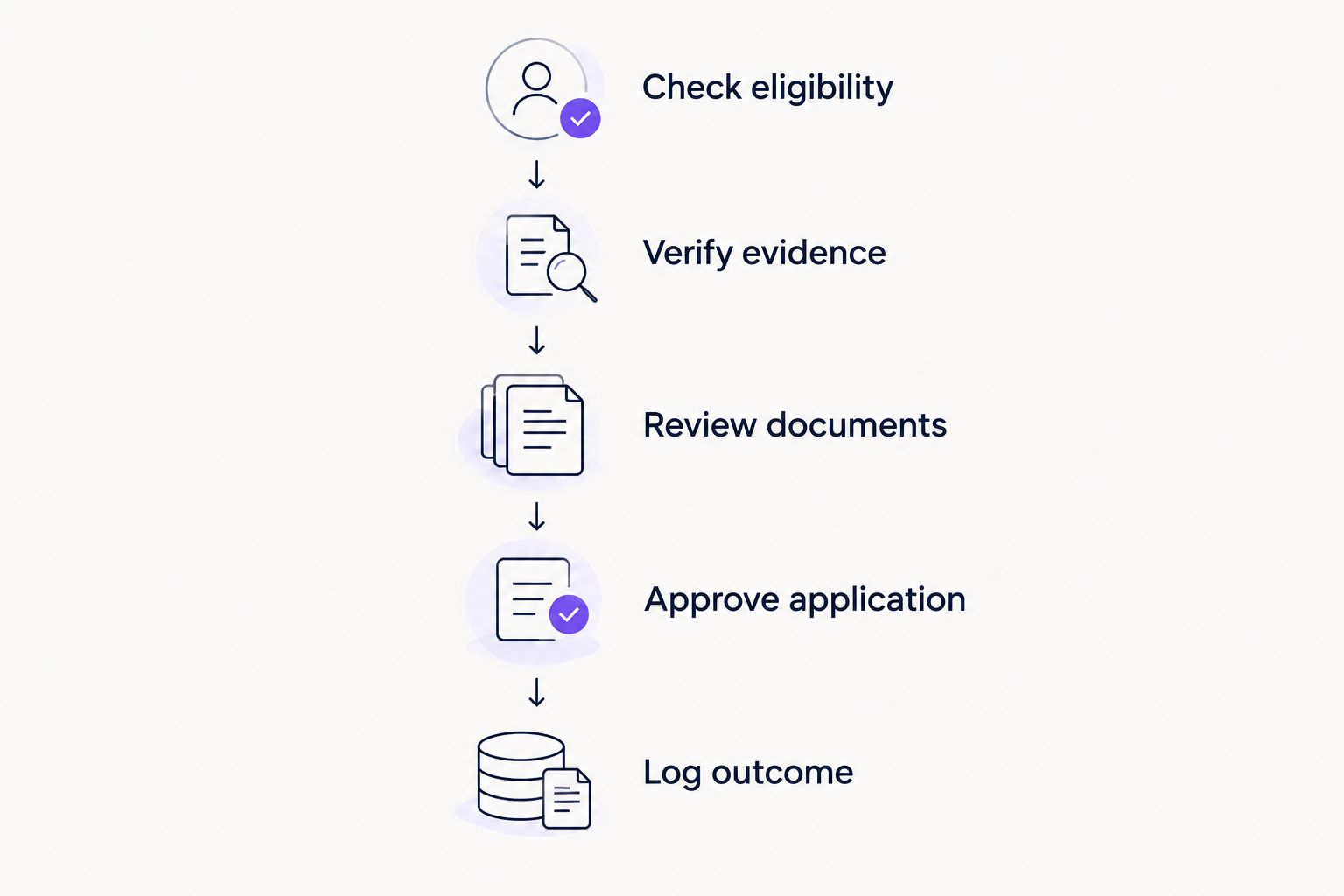
For a 2026 search, record the listing details and the version you actually used. Your tracker should explain what happened without relying on memory. Keep your own record regardless of which preparation tool you choose.
- Check eligibility: Confirm mandatory conditions and application instructions.
- Verify evidence: Check every claim against your source document.
- Review documents: Confirm names, dates, attachments, and requested answers.
- Approve application: Make the final decision yourself.
- Log outcome: Record the employer, role, action taken, and response.
Compare your nonprofit job-search options
Choose by task and control, not by how much text a tool produces. A manual process gives you direct oversight but leaves the preparation work with you. A writing assistant helps with drafting, while a job-search agent covers a different combination of tasks.
The options below are workflow choices, not a ranking based on hiring outcomes. No tool can promise an interview or an offer.
| Option | Best for | Main advantage | Key limitation |
|---|---|---|---|
| Manual search and spreadsheet | A focused search where you want to inspect every opening yourself | You control the criteria, documents, and application record | You perform discovery, tailoring, and tracking yourself |
| General-purpose writing assistant | Revising wording from a supplied job description and verified experience | Helps turn supplied facts into draft application language | You must check every claim; drafting alone does not cover the full search |
| AmazApply | Job seekers wanting matching, tailored documents, and application preparation | Combines those preparation tasks with individual review and approval | You still need to verify mission fit, eligibility, and factual accuracy |
For your 2026 decision, assess the output against a real opening. Can you trace the résumé statements to evidence? Does the cover letter address the role? Can you identify what still needs your attention? Those checks are more useful than judging a draft by its length or confidence.
Common mistakes nonprofit professionals make
Treating mission enthusiasm as a qualification
A statement about caring deeply for a cause does not show how you will perform the job. Connect your interest to relevant responsibilities, then use the rest of the application to establish your experience. Keep the distinction clear even when the mission is personally important.
Taking credit for an organization-wide outcome
Do not turn a team’s fundraising, service-delivery, or policy result into a personal achievement without explaining your contribution. State what you owned, what you supported, and what others delivered. Shared work remains credible when attribution is precise.
Matching titles instead of responsibilities
Do not apply solely because a title resembles your current role. Compare the actual work: donor stewardship, grant administration, program delivery, financial oversight, or another stated function. Reject a weak responsibility match even when the title and mission look attractive.
Adding sector language without sector experience
Do not replace ordinary responsibilities with nonprofit terminology that changes their meaning. Customer relationship work can provide relevant experience without becoming donor stewardship. Explain transferable skills directly rather than implying experience you do not have.
Sending the generated draft without checking instructions
A prepared résumé and cover letter do not establish that the application is complete. Read the employer’s instructions for requested documents, questions, and submission method. Check the final materials yourself before taking the next action.
FAQ
What are the best AI job search tools for nonprofit professionals?
The best fit depends on whether you need help with discovery, drafting, or application preparation. AmazApply fits job seekers who want matching openings and tailored application materials to review and approve; a manual workflow fits those who want to perform each task themselves.
Can I use these tools when moving from a business role into nonprofit work?
Yes, use them to explain relevant experience without claiming nonprofit responsibilities you have not held. Connect your actual work to the listing and distinguish transferable skills from direct sector experience.
Can a tool tell whether a nonprofit mission matches my values?
You need to make the final judgment about mission fit. Use the employer’s stated work and your own boundaries, then investigate questions that the listing does not answer.
Should I include fundraising figures on my résumé?
Include fundraising figures only when you can verify them, accurately attribute your contribution, and share them without breaching confidentiality. Otherwise, describe your responsibilities and deliverables without adding a number.
Is application preparation the same as automatic submission?
No, preparing application materials is different from submitting them to an employer. Keep review and approval explicit, and confirm how submission works before relying on any service.
How do I keep a generated cover letter accurate?
Draft from verified experience and compare every claim against your source material. Remove invented motivation, unsupported achievements, and statements that exaggerate your role.
Can job-search software guarantee an interview?
No tool can promise an interview or an offer. Use software to support preparation while keeping application accuracy and employer selection under your control.
One last thing
An omitted claim is better than an achievement you cannot defend. Before approving an application, choose its strongest statement and practice explaining your contribution, evidence, and limits aloud.
Use that test throughout your 2026 search. If the explanation does not match the written claim, revise the application—not your account of what happened. A tool can help prepare the wording; the experience must remain yours.