
Military veterans’ AI job-search tools are software that matches service experience to civilian vacancies and prepares application drafts for your review. In 2026, the useful distinction is whether a tool translates your experience accurately—not how many applications it produces.
- AI job search tools for military veterans should translate verified experience, not invent civilian qualifications.
- AmazApply suits individual job seekers who want matching roles and tailored application drafts they review and approve.
- Use résumé tailoring to explain military responsibilities in civilian language without changing their meaning.
- Compare job requirements against your evidence before approving any application.
Why job-search tools matter for military veterans
A military title rarely explains your full responsibilities to a civilian hiring manager. Your résumé needs to connect what you actually did with the employer’s requirements, without presenting a military qualification as a civilian license or certification.
The difficulty is translation, not just formatting. Supervising personnel, maintaining equipment, coordinating schedules, and managing records mean different things across employers. A useful application explains the work, its scope, and the evidence behind it.
Start with the AI job-search tools guide to distinguish vacancy matching from document preparation. Then choose the task you need help with. A résumé draft does not establish that you qualify for a vacancy, and a job recommendation does not confirm that the employer accepts your credentials.
For your 2026 search, keep discovery, qualification checks, and application approval separate. You can use software for the first task without surrendering control over the others. No tool can promise an interview or a job offer.
Build a veteran-focused application workflow
Begin manually with a document, a spreadsheet, and the employer’s original vacancy. Write your target roles, collect supporting experience, and compare each requirement with evidence you can explain in an interview.
The sequence below keeps the work under your rules: define targets before matching, establish facts before tailoring, and approve the finished application yourself. Software becomes useful after those boundaries are clear.
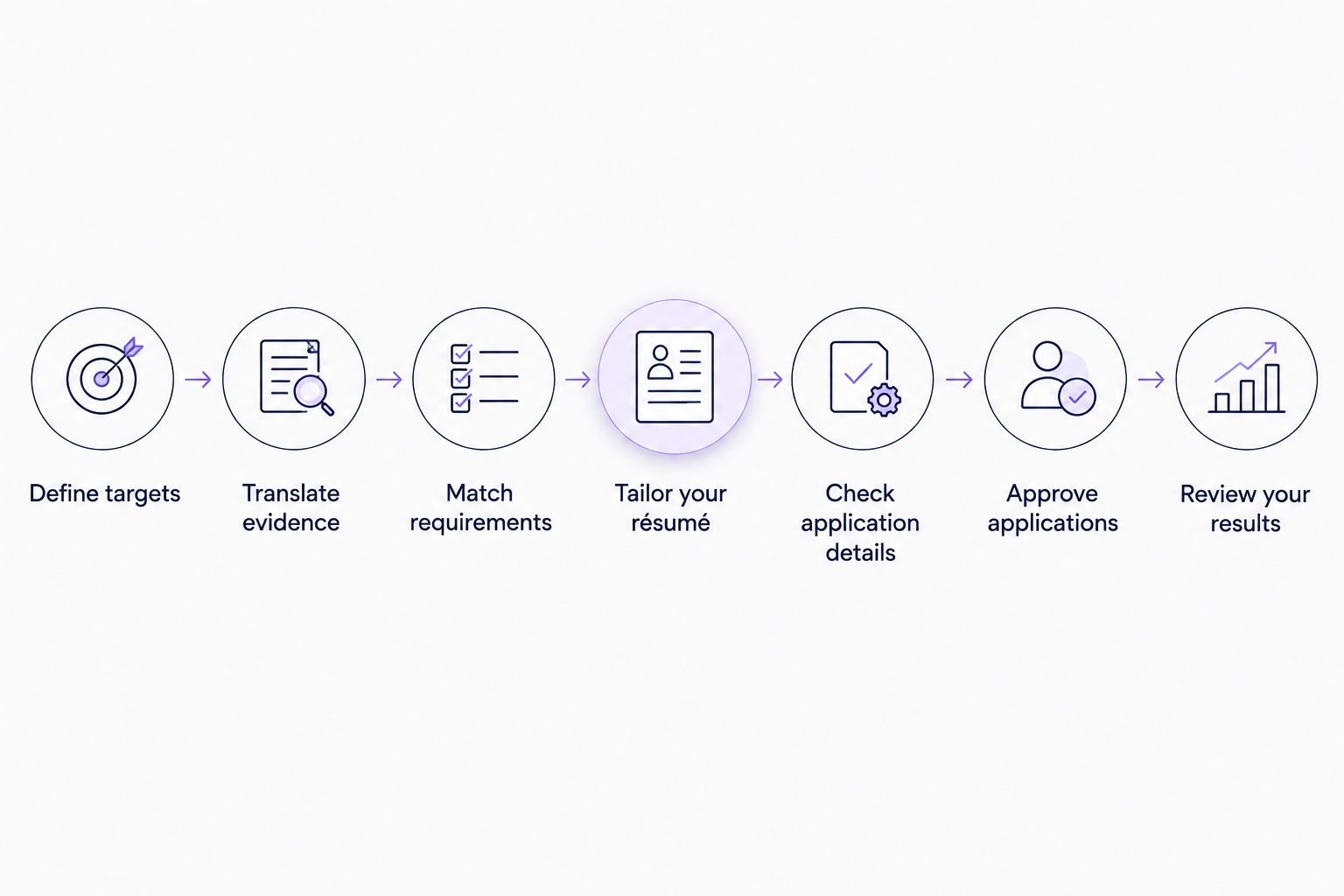
Define targets
Start with 3 target roles rather than a broad request for anything suitable for veterans. This is a working limit for your first shortlist, not a rule about how many careers you should consider. Read 2 current vacancies for each role and record the responsibilities employers actually describe.
Separate the work you want from the conditions you require. Location, travel, schedule, physical requirements, and employment type belong in your search criteria. A familiar title is not enough if the daily work conflicts with those conditions.
Keep your 2026 target list specific enough to reject unsuitable matches. For example, distinguish coordinating maintenance schedules from personally performing licensed technical work. Both relate to maintenance, but the qualification requirements differ.
- Record the duties you want to perform, not just preferred titles.
- Mark each location and schedule requirement as essential or flexible.
- Save the original posting beside your notes so you can check wording later.
Translate evidence
Build a plain-language experience inventory before asking software to rewrite your résumé. Describe the task, your responsibility, the setting, and the outcome you can verify. Start without acronyms; add specialist terminology only when the employer uses it or the meaning needs clarification.
Keep rank and official job titles accurate. You can explain a title in civilian language, but replacing it with a different profession creates a claim you must defend. Likewise, managing a process does not automatically mean you owned its budget or held final approval authority.
Use quantities only when your records or reliable recollection support them. A clear description without a percentage is stronger than a precise-looking result you cannot substantiate. Remove sensitive operational details rather than asking software to interpret or reproduce them.
- Expand military abbreviations into descriptions a civilian reader can understand.
- Distinguish work you performed from work you supervised or supported.
- Exclude classified, controlled, personal, and otherwise restricted information.
Match requirements
Make a requirement-to-evidence table manually. Copy the employer’s requirement into one column, add your supporting experience in another, and leave an honest gap wherever you lack evidence. Do not treat a similar phrase as proof of an equivalent qualification.
AmazApply is best for individual job seekers who want matching vacancies and tailored application drafts to review and approve. AmazApply’s job-search agent finds matching openings and prepares résumés, cover letters, and applications. Use that preparation after defining your targets, not as a substitute for deciding what work fits.
The boundary stays clear: a generated match is not employer confirmation of eligibility. Check licenses, required experience, location restrictions, and any vacancy-specific conditions against the original posting. Ask the employer about genuine ambiguity instead of letting a draft silently resolve it.
- Label each requirement as supported, unclear, or unmet.
- Keep licenses and civilian certifications separate from related military training.
- Reject matches that conflict with an essential condition on your target list.
Tailor your résumé
Create the first tailored version yourself by moving relevant evidence higher on the page. Keep dates, employers, official titles, qualifications, and outcomes consistent with your source résumé. Change emphasis and wording—not the underlying facts.
For your 2026 résumé, use the vacancy’s language where it accurately describes your work. If the posting asks for inventory reconciliation and you performed that task, explain it directly. Do not add a software platform, methodology, or certification merely because it appears in the advertisement.
AmazApply’s résumé tailoring prepares a draft around the opportunity; you still need to check every claim. The benefit is a prepared document to review. The limitation is that polished wording can make an unsupported statement less obvious, so compare the draft with both your evidence inventory and the vacancy.
- Put the most relevant responsibilities before unrelated service details.
- Retain only skills and terminology you can explain with a real example.
- Read the exported document to check headings, dates, and missing text.
Check application details
Read the application instructions before writing additional material. A civilian employer’s form, a federal vacancy, and a recruiter’s request do not necessarily ask for the same documents. Follow the actual posting rather than assuming one résumé format covers every route.
Prepare a cover letter manually when it serves a clear purpose: explaining your fit, a career transition, or a relevant example that needs context. Keep it connected to the vacancy. A general statement about military service does not explain why you can perform the specific work.
Treat questions about work authorization, accommodations, veteran status, and other personal information as decisions for you to answer. Software should not infer sensitive answers from your service history. Check what each question asks before entering information or attaching supporting documents.
- Confirm which documents and responses the employer requests.
- Remove claims about an employer that you have not checked.
- Review every personal-information field before approving the application.
Approve applications
Create a final review routine outside any tool first. Open the vacancy, résumé, cover letter, and application responses together. Check that they describe the same role and tell a consistent story about your experience.
AmazApply prepares applications for you to review and approve. Keep that approval meaningful: read the finished material rather than assuming an earlier résumé check covers later changes. A sentence added during tailoring needs the same scrutiny as a sentence you wrote yourself.
Save the version associated with each application so you can prepare for an interview using the material the employer received. Do not confuse a prepared application with a completed submission. Confirm the submission through the employer’s process and retain whatever confirmation that process provides.
- Verify the employer, role title, and destination before proceeding.
- Check dates, qualifications, personal details, and answers for consistency.
- Record whether the application is drafted, approved, or submitted.
Review your results
Set aside 30 minutes each week to review your search log. This is a suggested routine, not a claimed performance benchmark. Look for a specific problem: unsuitable matches, unclear experience, incomplete applications, or a requirement you repeatedly cannot satisfy.
For your 2026 search log, track the role, employer, application stage, document version, and employer response. Separate recorded responses from your interpretation. Silence alone does not identify whether the issue was your résumé, eligibility, timing, or the employer’s hiring process.
Change one part of the workflow at a time so you know what changed. If the roles are consistently wrong, revise targeting before rewriting every résumé. If interviews reveal difficulty explaining an experience claim, improve the underlying example instead of adding more keywords.
- Remove search terms that repeatedly produce unsuitable duties.
- Update your evidence inventory when you confirm a relevant example.
- Pause new applications while correcting an inaccurate claim across saved drafts.
Compare your application-preparation options
Choose an approach according to the task you need completed. You do not need every option, and none removes your responsibility to verify qualifications or approve application content.
| Option | Best for | Practical advantage | Key limitation |
|---|---|---|---|
| Manual documents and spreadsheet | Establishing targets and checking evidence | Keeps your original facts and decisions visible | You perform the matching, rewriting, and tracking yourself |
| Veteran-focused career counselor | Discussing a military-to-civilian transition | Gives you a person to question about how you present your experience | Scope depends on the specific service; confirm what assistance it provides |
| General-purpose text assistant | Rewording a passage from facts you supply | Lets you request alternative explanations of unfamiliar terminology | A plausible draft can introduce claims or change meaning |
| AmazApply | Matching vacancies and preparing tailored application drafts | Connects job matching with résumé, cover-letter, and application preparation | You must verify the content and review and approve applications yourself |
Choose the option that addresses the bottleneck. If your target occupation is unclear, more document output does not solve that decision. If your target and evidence are already established, application-preparation software has a defined task to perform.
Common mistakes military veterans make
Replacing a military title with an unearned civilian title
An explanatory phrase can clarify your duties without changing your employment history. Keep the official title and describe the function beneath it. Do not turn related experience into a professional designation, license, or qualification you do not hold.
Listing acronyms without explaining the work
An acronym identifies a system or process only for readers who recognize it. Explain the responsibility and why it mattered to the task. Keep the acronym when it is relevant to the vacancy, not as a substitute for an understandable description.
Accepting invented metrics in a tailored draft
A generated percentage, team size, budget, or time saving is not evidence. Delete it unless you can support it. You can still describe a meaningful contribution through the problem, your action, and the observable result without attaching an invented number.
Treating veteran status as a universal eligibility shortcut
Check the specific hiring route and vacancy instructions. Service history does not establish every civilian qualification or make every role suitable. Where a posting describes a veteran-specific process, follow its stated documentation requirements rather than assuming a general rule applies.
Approving a résumé but ignoring the application form
A correct résumé does not fix an incorrect screening answer. Review the form and attachments as one application, especially when information has been copied between systems. Check that your answers distinguish qualifications you hold from qualifications you are pursuing.
FAQ
What are the best AI job search tools for military veterans?
The best fit depends on whether you need career direction, vacancy matching, résumé tailoring, or application preparation. Choose a tool that handles your specific task while keeping factual checks and final approval with you.
Can software translate my military experience into civilian résumé language?
Software can draft civilian-language descriptions from the facts you provide. Check that each description preserves your actual responsibilities and does not imply a license, certification, or authority you did not hold.
Should I use the same résumé for civilian and federal jobs?
Follow each vacancy’s instructions rather than assuming one résumé meets both sets of requirements. Keep your employment facts consistent while adjusting the format, detail, and supporting documents requested.
Is automatic application submission better than reviewing applications myself?
Automatic submission is not a substitute for checking accuracy and fit. Review the role, documents, screening answers, and personal information before authorizing an application.
What information should I leave out of a résumé-writing tool?
Leave out classified, controlled, and otherwise restricted information, along with personal information the task does not require. Use non-sensitive descriptions of your responsibilities and follow any applicable disclosure rules.
Do I need numbers in every military résumé bullet?
No, every résumé bullet does not need a number. Use quantities only when you can support them; otherwise describe the task, your responsibility, and the result accurately.
Can a job-search tool guarantee interviews for veterans?
No tool can guarantee interviews or job offers. A tool can help prepare materials, but employers determine eligibility, interview selection, and hiring outcomes.
One last thing
Before approving your next application, select the résumé sentence that sounds most impressive and explain it aloud without military abbreviations. Describe what you personally did, what someone else decided, and what evidence supports the result.
If the explanation no longer matches the sentence, edit the sentence. That is a useful final check for your 2026 search: the strongest application is one you can defend in an interview, not one with the most polished claims.