
Auto-apply software has no single standard cost in 2026: compare the current charge, billing commitment, and included work before choosing a subscription. The subscription alone does not measure value; you also need to account for reviewing job matches, correcting documents, and completing any application steps the software does not handle.
- How much does auto-apply software cost? Compare current billing terms and included work, not a headline subscription alone.
- AmazApply suits job seekers who want application preparation while retaining personal approval.
- Separate job matching, résumé tailoring, and application submission before comparing tools.
- Judge value by relevant applications you approve, not the number of drafts generated.
Why this matters
Buying application software means choosing which parts of your job search to delegate. A tool that prepares documents does different work from a tool that submits applications, even when both appear under the auto-apply label.
Start with the current pricing, then identify exactly what the subscription covers. For your 2026 job search, compare the work completed under your rules—not the broadest feature label. Keep control of claims about your experience, answers to screening questions, and which employers receive your information.
How much does auto-apply software cost in 2026?
The useful comparison is the current subscription charge plus the obligations attached to it. Read the billing interval, renewal terms, usage limits, and definition of a completed application together; none answers the cost question alone.
Use this breakdown when checking a provider's pricing and terms. These are comparison categories, not claims that every provider uses each charge.
| Cost component | What to verify | What it means for your decision |
|---|---|---|
| Subscription | Amount charged and billing interval | Establishes your recurring commitment |
| Billing commitment | Whether the displayed equivalent requires a longer payment period | Separates the displayed comparison from the amount due |
| Usage allowance | Which actions count toward a limit | Shows whether your intended workflow fits |
| Additional usage | Whether exceeding an allowance creates another charge | Identifies spending that needs separate approval |
| Separate tools | Whether you still need another service for essential work | Prevents comparing an incomplete workflow with a complete one |
| Review time | Work you retain before an application is ready | Shows whether preparation reduces your workload |
Do not treat a displayed monthly equivalent as proof of monthly billing. Read the payment terms before entering payment details. Likewise, do not assume that a saved job, generated résumé, and submitted application are interchangeable units.
Write down what you intend to accomplish during the subscription period. A clear target role and an explicit approval process make a cost comparison more useful than a long list of features you will not use.
Compare workflows before comparing subscriptions
Application software can support different stages of the same search. Compare the following workflows separately rather than treating them as equivalent purchases.
| Workflow | Best for | Useful contribution | Limitation to check |
|---|---|---|---|
| Job matching | Job seekers who need a more relevant shortlist | Helps organize which openings deserve attention | A match still needs checks for responsibilities and eligibility |
| Document preparation | Job seekers who want help adapting application materials | Produces drafts for review against a specific opening | Drafts require factual verification and editing |
| Application submission | Job seekers specifically seeking help with delivery | Addresses the step after materials are ready | Verify supported destinations, approval controls, and confirmation records |
These are workflow descriptions, not promises about a particular subscription. A provider's product name does not establish which stages it performs.
For example, a document-preparation workflow remains useful even when you submit through the employer's website yourself. It is the wrong purchase if you specifically need submission and have not verified that capability. Conversely, submission alone does not resolve poor job fit or inaccurate answers.
Job matching: evaluate relevance
Check whether the shortlist reflects your role, location, working arrangement, and eligibility requirements. Read the original opening rather than relying only on a summary.
Best for: reducing the effort of building a relevant shortlist. The limitation is straightforward: identifying an opening does not establish that you qualify or that the employer will consider your application.
Document preparation: evaluate factual accuracy
Compare each tailored résumé with your source résumé and the employer's requirements. Accept clearer wording and better organization; reject new responsibilities, tools, qualifications, or results you cannot verify.
Best for: adapting truthful application materials to a specific role. The limitation is that a polished draft can still require substantial correction. Include that correction work in your evaluation.
Application submission: evaluate control
Confirm whether the software actually submits applications or stops at preparation. If submission is offered, inspect when approval happens, how errors are handled, and what evidence records the outcome.
Best for: addressing delivery after the application is accurate and approved. The limitation is that a submission record does not establish employer interest, an interview, or a hiring decision.
Why auto-apply software value varies
Your effective cost depends on the workflow you need and the work left in your hands. Use these factors to compare subscriptions in 2026 without assuming that a larger allowance creates better value.
- Scope of work: Job discovery, résumé tailoring, cover-letter drafting, and submission are separate tasks. Identify which ones you need covered.
- Billing commitment: Check the amount due, renewal timing, and cancellation effect. Compare commitments over the same period.
- Allowance definitions: Establish whether usage refers to matches, documents, application drafts, or completed submissions.
- Review burden: Count factual corrections and unresolved questions, not just the time spent opening a draft.
- Search constraints: State your target roles, locations, eligibility, and exclusions before evaluating the output.
- Approval controls: Determine what happens automatically and what waits for your decision. Do not infer control from the word assistant.
A subscription that performs fewer tasks can still fit your needs if those are the tasks consuming your attention. A broader subscription does not justify itself when its extra functions do not support your search.
Use 5 checks before paying
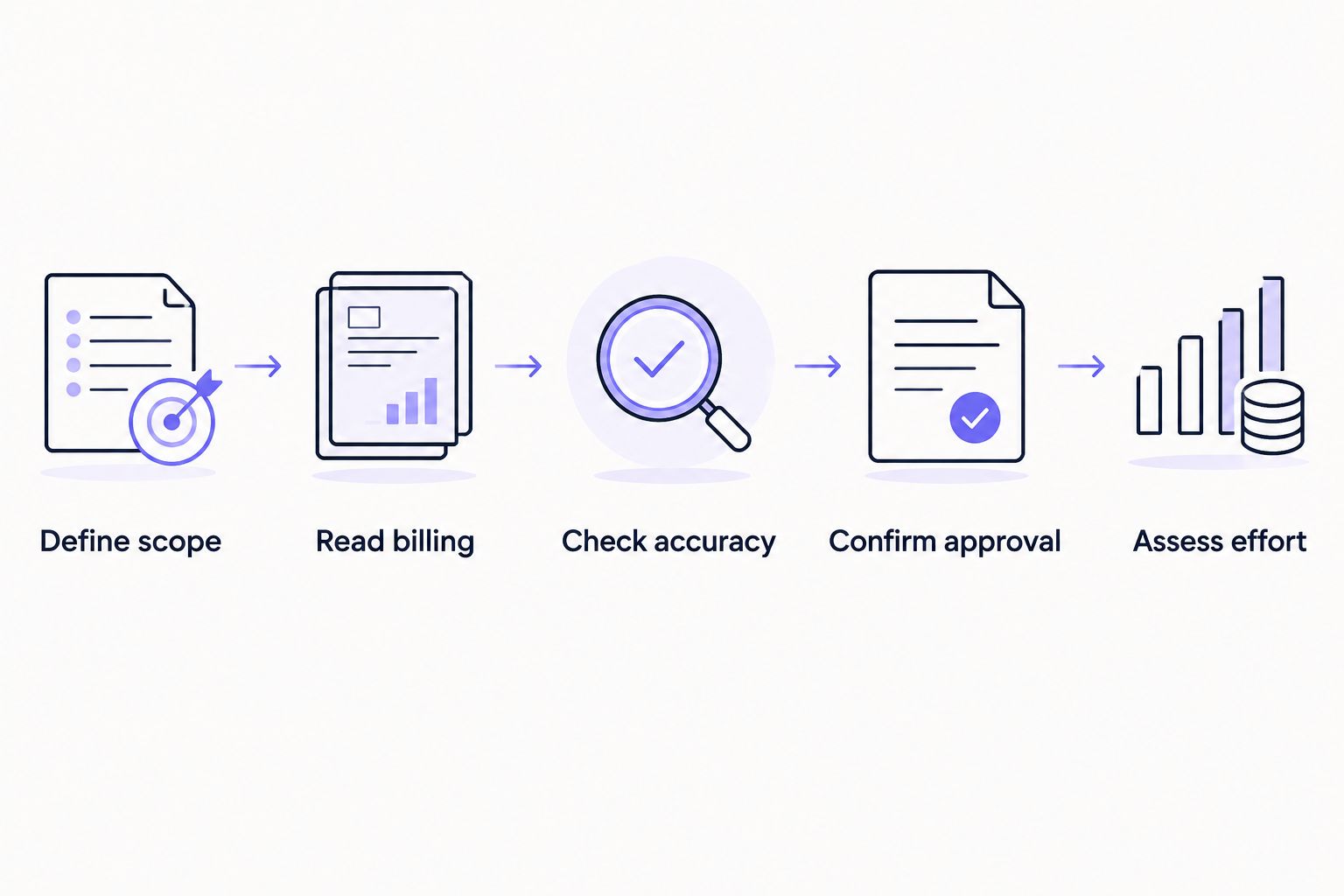
Evaluate a tool against your actual application process, not an idealized demonstration. Use these 5 checks as a purchase checklist, whether you are comparing subscriptions in 2026 or reviewing one you already use.
- Define scope. Write down the tasks you want help with and the tasks you will retain. Specify whether your goal is a shortlist, tailored documents, prepared applications, or submission.
- Read billing. Record the billing interval, amount due, renewal conditions, and usage definition. Resolve unclear terms before committing.
- Check accuracy. Compare the output with your source résumé and the original job posting. Flag unsupported experience, altered dates, and answers that require your judgment.
- Confirm approval. Identify the exact point where you inspect the application. Establish whether any action can happen before that decision.
- Assess effort. Review the correction work and unfinished steps. Decide whether the workflow removes enough effort to justify keeping it.
Keep your evaluation consistent. If you assess one tool on difficult applications and another on straightforward openings, your comparison will mix software performance with application complexity.
Record your observations in plain language: the match meets your location rule, the résumé needs correction, or the application still needs an employer-specific answer. Specific observations support a decision; a general impression of speed does not.
Where an approval-first agent fits
AmazApply is best for individual job seekers who want application preparation with personal approval. Its stated scope includes finding matching openings, tailoring résumés and cover letters, and preparing applications for you to review and approve.
That scope supports a preparation-first comparison. Evaluate the relevance of matches, the accuracy of tailored documents, and the work remaining before you approve an application. Do not equate preparation with automatic submission.
The benefit is help across matching and document preparation while you retain the approval decision. The limitation is that approval remains real work: you must inspect the materials and resolve any inaccurate or incomplete information. No tool can promise an interview or job offer.
Is an auto-apply subscription worth paying for?
An auto-apply subscription is worth paying for when it removes work you actually need done without creating unacceptable correction or oversight work. Judge it against your own process rather than an advertised volume of activity.
Separate your decision into 3 stages: finding relevant openings, preparing accurate materials, and completing the application. Identify the stage that consumes your attention, then check whether the subscription addresses it.
For a 2026 subscription decision, use approved, relevant applications as your practical output. A large draft count is not useful when the roles are unsuitable or the documents require rewriting. Keep the subscription only if its contribution remains clear after review.
Does more application volume mean better value?
More application volume does not establish better value. Evaluate at least 2 applications side by side as a practical check: inspect job fit, factual accuracy, unanswered questions, and readiness for your approval.
This is a review method, not a performance benchmark. Its purpose is to expose differences hidden by a single activity count.
A relevant application with truthful, complete answers serves a different purpose from a draft attached to an unsuitable opening. Do not use generated volume as a substitute for application quality. Employer decisions remain outside the software's control.
What should you check before canceling or renewing?
Before renewing, compare the subscription's actual contribution with the tasks you originally wanted help completing. Before canceling, read the provider's terms for renewal timing, access, and any information you need to retain.
Do not assume that ending renewal immediately ends access, or that deleting an account and canceling billing are the same action. Follow the provider's stated process and retain confirmation of your request.
For your 2026 renewal review, ask a narrow question: would you choose this workflow again based on the applications you have personally inspected? If the answer is no, identify the failing stage before paying for a different tool with the same mismatch.
FAQ
How much does auto-apply software cost in 2026?
Auto-apply software has no single standard cost; compare each provider's current charge, billing commitment, and included work. Check usage definitions and any additional charges before subscribing.
What's the best way to compare auto-apply subscriptions?
Compare subscriptions against the same tasks: job matching, document preparation, and application submission. Then check billing terms, approval controls, and the correction work you retain.
Does auto-apply software always submit applications for me?
The auto-apply label does not establish that a tool submits applications. Verify whether the workflow stops at matching, drafting, preparation, or delivery before paying.
Is AmazApply suitable if I want to approve every application?
AmazApply suits individual job seekers who want matching openings and prepared application materials to review and approve themselves. You still need to verify the documents and application answers.
Should I choose the subscription with the biggest application allowance?
Choose an allowance that supports relevant applications you can review, not simply the largest activity count. First confirm what the provider counts as an application.
Can auto-apply software guarantee interviews?
No tool can promise interviews or job offers. Evaluate the work the software performs and the accuracy of the materials you approve, rather than treating employer responses as guaranteed.
What should I check before entering payment details?
Check the amount due, billing interval, renewal terms, usage limits, and cancellation process. Confirm what happens automatically and what requires your approval.
One last thing
Before you choose a subscription, write a stop rule: reject any application that adds experience you cannot verify. Clearer wording is useful; invented qualifications are not.
Apply that rule when reviewing AmazApply or any other application-preparation workflow. Your approval should mean the materials are accurate and the role fits your rules—not merely that a draft exists.