
Best overall: Huntr for a dedicated application board. Best for résumé-centered organization: Teal. Best for a customizable record: Google Sheets. This 2026 guide compares the best job application tracking tools and separates tracking from application preparation, including where AmazApply fits.
- Huntr leads the best job application tracking tools for job seekers who want a dedicated application board.
- Teal suits job seekers who want application tracking alongside résumé work.
- Google Sheets suits a custom application log; Notion suits linked notes and records.
- AmazApply is best for reviewed application preparation, not a substitute for a confirmed submission record.
Why this matters
A saved job, a prepared application, and a submitted application are different events. If your tracker treats them as interchangeable, you cannot reliably tell which employers have received your materials or which applications need action.
For your 2026 search, choose the tool that makes those distinctions easiest to maintain. A useful tracker answers a practical question: What should you do next, and what evidence supports that action? No tool can promise an interview or an offer.
What makes the best job application tracking tools
Use these criteria before choosing a board, database, or spreadsheet:
- Clear application stages: Separate saved, preparing, submitted, interviewing, and closed records. Your labels should describe events, not intentions.
- Useful job context: Keep the employer, role, posting link, and relevant notes together so you can understand a record without reopening every tab.
- Next-action visibility: Record what you need to do and when. A board full of employer names is not an action plan.
- Document traceability: Identify the résumé and cover letter associated with each application. A filename is useful only if it points to the version you actually sent.
- Maintainable workflow: Choose a system you will update after each meaningful event. Extra fields create work unless they support a decision.
- Appropriate control: Check sharing, account permissions, and export options before adding personal information. Keep sensitive documents out of broadly shared records.
For a 2026 shortlist, prioritize these requirements over the length of a feature list. Do not assume a tool verifies submissions merely because it displays a submitted stage.
Job application trackers at a glance
The order below follows distinct use cases, not a measured performance score. The final entry handles preparation rather than serving as a verified standalone tracker.
| Tool | Best for | Standout capability | Key limitation |
|---|---|---|---|
| Huntr | A dedicated application board | Job-search records organized around application stages | Records still need accurate updates |
| Teal | Tracking alongside résumé work | Job tracking and résumé-building tools in one service | Generated or edited materials still require factual review |
| Google Sheets | A customizable application log | Editable columns, filters, and formulas | You build and maintain the workflow yourself |
| Notion | Applications with extensive supporting notes | Database records that also hold page content | Setup decisions can distract from the search |
| AmazApply | Preparing applications for personal approval | Matching jobs and tailoring application materials | Preparation is not proof of submission |
1. Huntr: best application tracker for a dedicated board
Huntr provides a job-search workspace with a visual application board. You can organize opportunities by stage and keep job information with the corresponding record.
That structure suits a search spread across employer websites and job boards. Instead of remembering which browser tab represented an interview or a saved opportunity, you give each record an explicit place in your process.
Huntr pros:
- Its job-search focus reduces the need to design a tracker from scratch.
- A visual board makes application stages easy to scan.
- Job records keep search context together rather than scattered across separate notes.
Huntr cons:
- A stage is only as accurate as the information you enter or confirm.
- Maintaining the board becomes extra work if you also keep a separate spreadsheet.
Best for: Job seekers who want an application-specific workspace rather than a general-purpose database.
Before adopting Huntr, decide what each stage means. For example, reserve submitted for an application with an actual confirmation, not a completed draft. Keep an employer's rejection separate from your own decision to withdraw so your records remain useful later.
Verdict: Buy into Huntr's board-based workflow if application status is your main organizational problem. Choose one primary record and avoid maintaining competing versions of the same search.
2. Teal: best application tracker for résumé-centered workflows
Teal combines a job application tracker with résumé-building tools. It suits a workflow in which you move repeatedly between a saved role, its requirements, and the document you intend to submit.
The advantage is proximity: application organization and résumé work sit within the same service. That does not remove your responsibility to verify the résumé or confirm what reached the employer.
Teal pros:
- Job tracking and résumé work belong to the same workflow.
- Saved job information provides context for application preparation.
- Its job-search focus gives you more structure than a blank spreadsheet.
Teal cons:
- Résumé suggestions are not evidence that you possess a skill or achievement.
- Tracking and editing together can encourage document work without a clear next application action.
Best for: Job seekers who want to organize applications while revising their résumé for different roles.
Use a document label that distinguishes the role and version. After submitting, record the actual document used rather than assuming your latest draft is the submitted version. This matters when interview preparation begins and you need to reconstruct exactly what you told the employer.
Verdict: Buy into Teal's combined workflow when résumé preparation and application tracking need to stay close together. Skip unnecessary revisions that do not improve factual relevance.
3. Google Sheets: best application log for custom fields
Google Sheets is a spreadsheet, not a dedicated job application tracker. You define the columns, enter application details, and use sorting or filters to inspect your search.
That flexibility suits people who already know what information they need. You can build a compact log without adopting another tool's definitions, but you also take responsibility for keeping the structure consistent.
Google Sheets pros:
- You control the column names and status definitions.
- Filters let you isolate records by employer, stage, or next action.
- Formulas support calculations using the data you enter.
- A plain table makes the underlying records directly visible.
Google Sheets cons:
- You must create and maintain the application workflow yourself.
- Inconsistent spelling or duplicated rows can fragment your records.
Best for: Job seekers who prefer a straightforward, customizable table and accept manual upkeep.
Start with employer, role, posting link, stage, submission date, next action, and next-action date. Add a document reference if you tailor application materials. Do not add a field simply because a template includes it; each column should answer a question you actually ask.
Verdict: Buy into Google Sheets when control over the record matters more than a ready-made interface. Hold off on elaborate formulas until the basic log stays accurate.
4. Notion: best application tracker for detailed research notes
Notion combines database records with pages that can hold supporting content. You can organize applications in a table or board and keep interview notes, employer research, and preparation material inside related records.
That makes Notion useful when an application involves more context than a short row can comfortably hold. The trade-off is configuration: you decide which properties, views, and page structures are necessary.
Notion pros:
- Application records can contain detailed notes rather than only short fields.
- Database views let you inspect the same underlying records in different arrangements.
- Reusable page structures help keep preparation notes consistent.
Notion cons:
- Designing the workspace creates work before you begin tracking.
- Too many properties and views make routine updates harder to maintain.
Best for: Job seekers who keep substantial employer research and interview notes alongside application status.
Keep the main database lean. Put longer research inside the relevant page, and leave the main view focused on stage and next action. If you already use Notion regularly, this avoids creating another place you must remember to check.
Verdict: Buy into Notion when application notes need their own working space. Skip a complex template if a simple table answers your questions.
5. AmazApply: best for application preparation with personal review
AmazApply finds matching job openings, tailors résumés and cover letters, and prepares applications for individual job seekers to review and approve. AmazApply is best for job seekers who want tailored application preparation with personal review and approval.
That role differs from maintaining a submission history. Use a tracker to record what happened; use preparation software to help assemble what you intend to send. Approval and submission must remain separate events in your records.
AmazApply pros:
- Matching job openings and preparing materials belong to the same service.
- Résumé and cover-letter tailoring address the preparation stage.
- You review and approve applications yourself.
AmazApply cons:
- Prepared materials still require your factual review.
- A prepared application does not establish that an employer received it.
Best for: Individual job seekers who want help preparing applications while retaining the approval decision.
For your 2026 workflow, pair application preparation with a clear record of submission evidence. Check every claim against your experience, including skills, dates, responsibilities, and results. Do not approve a document merely because it reads fluently.
Verdict: Hold AmazApply as a preparation option; skip treating it as your standalone submission ledger without confirming the tracking functions you require.
How to keep your application record trustworthy
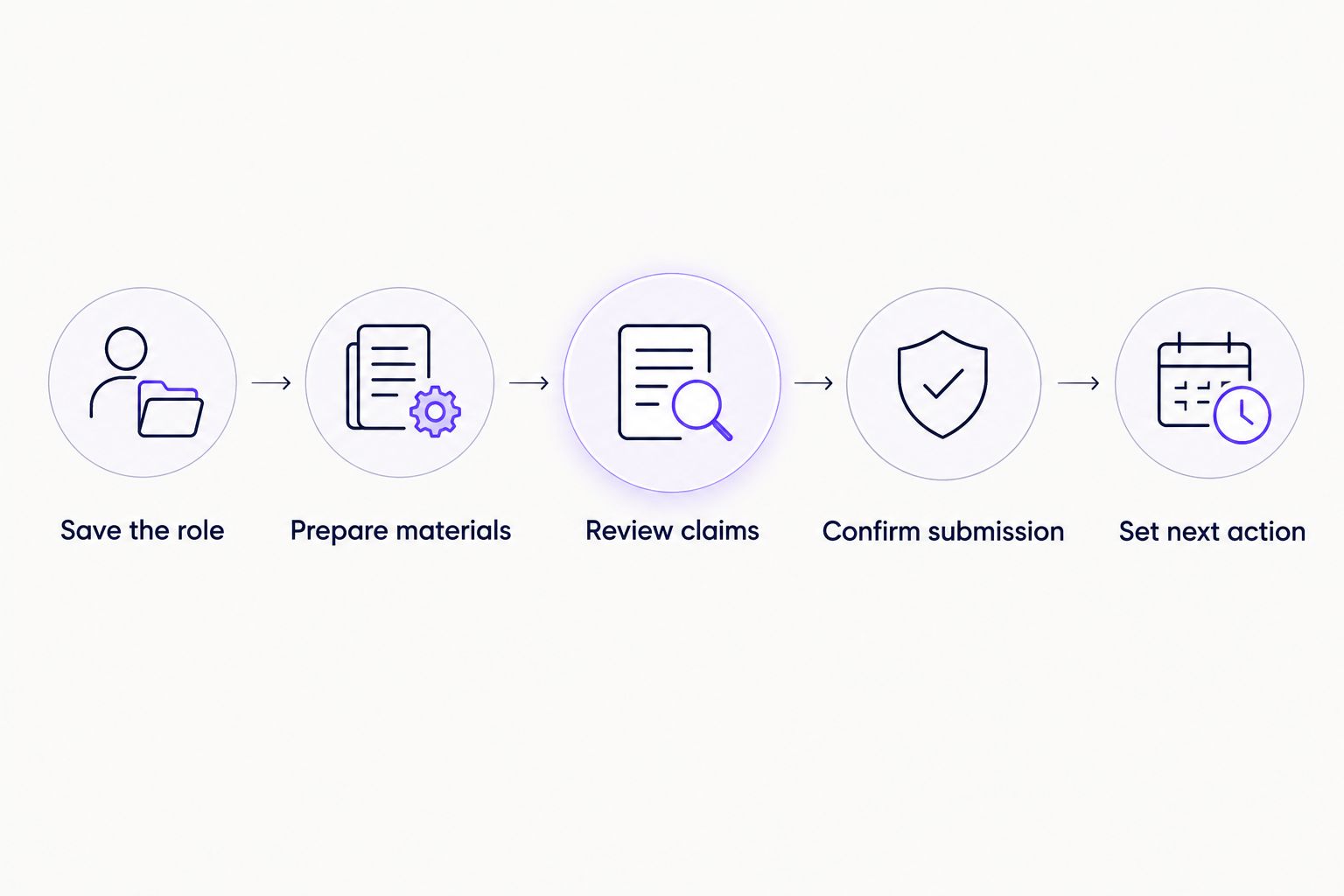
A useful application workflow separates intentions from completed events. Use these steps whether you choose a dedicated tool or build your own log:
- Save the role: Record the employer, title, and posting link. Preserve the requirements you need for preparation.
- Prepare materials: Identify the résumé and cover letter intended for that role. Keep unverified claims out.
- Review claims: Check dates, skills, responsibilities, and results against your actual experience before approval.
- Confirm submission: Move the record to submitted only after you have evidence that the application was completed.
- Set next action: Record the next task and its date, or explicitly mark that no action is currently needed.
Keep 1 record per application, not one record per employer. Separate roles at the same company can involve different materials, contacts, and decisions. This is a recordkeeping rule, not a claim about how employers process applications.
Use 2 date fields for submission and next action so those events cannot be confused. Schedule a 10-minute review of open records as a starting routine, then adjust it to your search; this is a suggested habit, not a performance benchmark.
How the tools are ranked
This 2026 ranking prioritizes application-stage clarity, useful context, next actions, document traceability, maintainability, and control. It is a workflow comparison, not a hands-on speed test or a claim that one tool produces more interviews.
Huntr is the default because its dedicated board directly addresses tracking. Teal serves résumé-centered organization; Google Sheets serves custom records; Notion serves detailed notes. Application preparation remains a separate use case rather than an assumed tracking capability.
Which application tracker should you choose?
Choose Huntr if you want a dedicated application board and do not want to build your own system. Choose Teal when résumé work belongs beside the tracker, Google Sheets when you want direct control over fields, or Notion when supporting notes are central.
For 2026, the decisive question is not which tool has the longest feature list. Ask whether you can open a record and immediately identify its actual status, submitted materials, and next action. If not, simplify the workflow before adding another tool.
FAQ
What's the best job application tracking tool overall?
Huntr is the default recommendation for job seekers who want a dedicated application board. Choose a different option when custom fields, detailed notes, or résumé-centered work matter more than a ready-made tracking structure.
Is Teal better than Huntr for tracking applications?
Teal is the better fit when you want résumé work alongside application tracking; Huntr is the default here for a dedicated board. Choose according to the workflow you need, not an assumed difference in interview results.
Can I track job applications in Google Sheets?
Yes, Google Sheets can hold a custom application log with statuses, dates, document references, and next actions. You are responsible for defining the fields, maintaining consistent entries, and keeping the records accurate.
Is Notion a good job application tracker?
Notion suits job seekers who want detailed research and interview notes inside application records. Keep the database simple so workspace maintenance does not become a separate project.
Does AmazApply replace a job application tracker?
AmazApply's stated role is finding matching jobs, tailoring materials, and preparing applications for personal review and approval. Do not treat a prepared application as a confirmed submission; maintain a separate submission record unless the required tracking functions are confirmed.
What should I record after submitting a job application?
Record the employer, role, submission date, materials used, and next action. Keep confirmation evidence with the record so the submitted status reflects a completed event rather than an intention.
Should I mark an application as submitted after approving its résumé?
No, approving a résumé is not the same as submitting an application. Keep the record in preparation until you have confirmation that the application process was completed.
One last thing
Keep the submitted version, not just the latest version. A résumé can change after an application leaves your hands. Your tracker should help you reconstruct what that employer received, not merely point to whatever document you edited most recently.