
Retail workers’ auto-apply job tools are application-support systems for finding relevant openings and preparing applications with the aim of securing work that fits your schedule, location, and experience. The best workflow checks shift requirements and travel limits before drafting anything; automatic submission is not a substitute for those checks.
- Choose auto-apply job tools for retail workers around shift fit, travel limits, and application review—not submission volume.
- AmazApply suits retail job seekers who want application preparation with personal review and approval.
- Use résumé tailoring to describe verified retail experience, not to add skills you cannot demonstrate.
- Confirm employer requirements before sending applications; a prepared draft is not a submitted application.
Why auto-apply tools matter for retail workers
A retail vacancy can match your job title and still fail your practical requirements. Opening shifts, closing duties, weekend expectations, store location, and contracted hours belong in your screening process—not in a conversation after you have applied.
For your 2026 search, separate eligibility from preference. A shift you cannot work is a hard exclusion. A preferred department is a ranking factor. Treating both as optional produces a list that looks relevant but requires you to screen it again.
Your résumé needs the same discipline. Use this résumé tailoring guide to connect a vacancy’s wording with experience you can verify. Describe cash handling, replenishment, customer service, or team supervision only when those responsibilities were yours.
Choose application support that preserves your decisions. No tool can promise an interview, an offer, or a particular shift. Its useful role is to organize suitable opportunities and prepare accurate materials while you retain responsibility for what reaches an employer.
Build your retail application workflow for 2026
Start with a document and a spreadsheet. Write your requirements, save evidence of your work, and record applications yourself before deciding which parts need software support. This gives you a reference against which to check any generated match or draft.
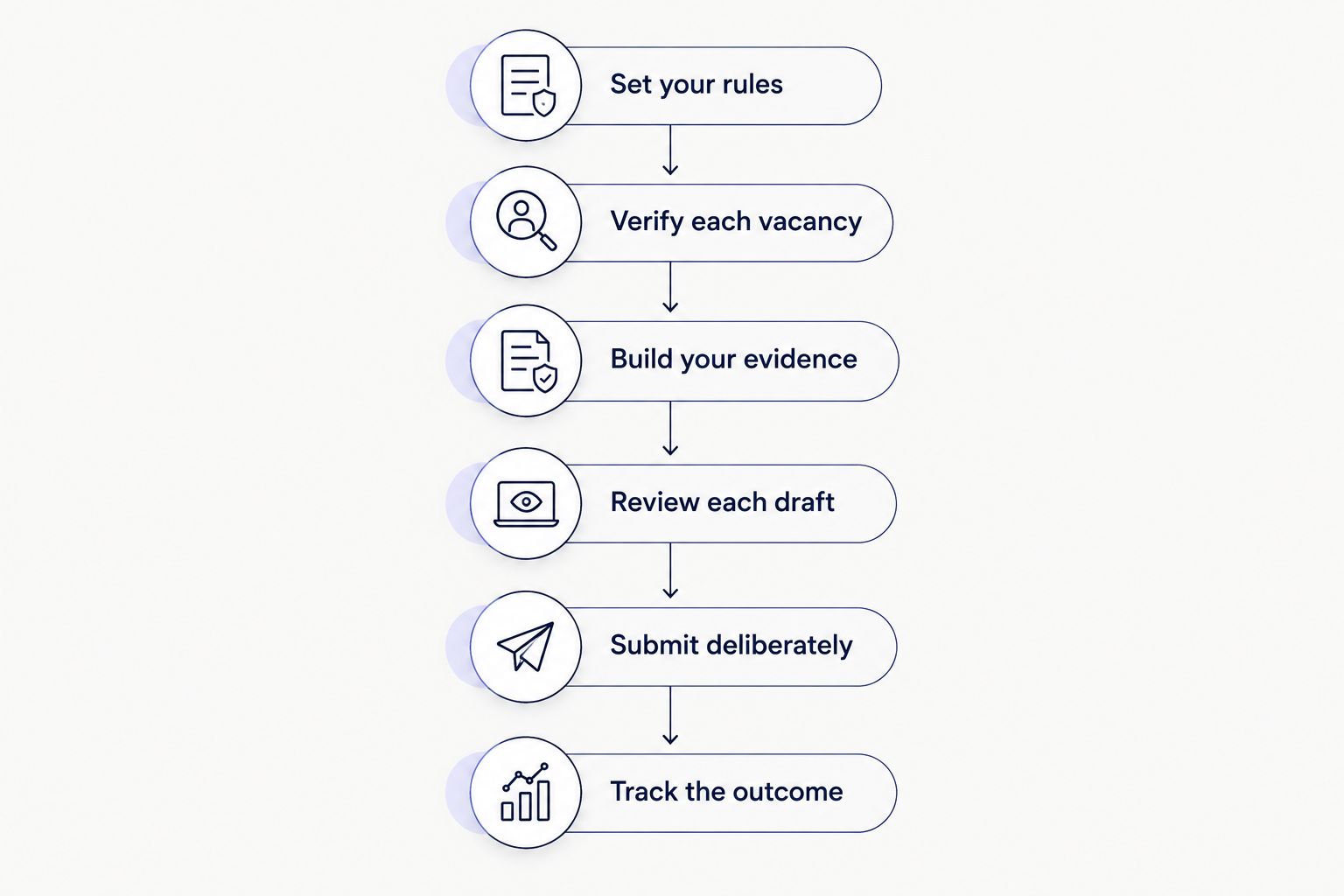
Use the following sequence: Set your rules, Verify each vacancy, Build your evidence, Review each draft, Submit deliberately, and Track the outcome. Keep screening ahead of drafting so you do not spend time polishing an application for an unsuitable role.
Set your rules
Create a written search brief before opening a job board. Use a suggested 20-minute setup session to distinguish requirements you cannot change from preferences you can discuss. This is a planning allowance, not a claim about how quickly a tool works.
Record your actual availability rather than writing flexible because it sounds attractive. If you can work evenings but not opening shifts, say that. If your schedule changes, update the brief before preparing another application.
Choose role families deliberately. Sales associate, stockroom assistant, cashier, and supervisor describe different responsibilities; interest in one does not establish suitability for the others. Include a supervisory role only when your experience supports its requirements.
A specific brief also makes software easier to evaluate: you can inspect whether suggested openings follow your rules instead of judging relevance by title alone.
- Availability: Record workable days, shift windows, and fixed commitments.
- Travel limits: List acceptable store locations and realistic transport options.
- Role scope: Separate customer-facing, stockroom, specialist, and supervisory work.
- Employment terms: Identify acceptable contract types and required hours.
- Exclusions: Write down conditions that make an opening unsuitable.
Verify each vacancy
Read the employer’s current vacancy details before adapting your résumé. Save the title, location, application instructions, and any job reference in your tracker. A matching title alone does not establish that the opening meets your requirements.
Check descriptions for obligations hidden outside the headline. A daytime role can still specify weekend work; a store-based position can include work at other locations. Use what the employer actually states, and mark unanswered questions for follow-up rather than filling gaps with assumptions.
Keep duplicate listings together. When the same employer and location appear through different routes, compare the job reference and responsibilities before preparing another application. Separate openings deserve separate records; repeated copies of one opening do not.
For a 2026 application, use the current vacancy text as your drafting reference rather than an old saved description. Recheck the details before sending.
- Confirm the employer, store location, title, and job reference.
- Read shift, weekend, travel, and contract requirements.
- Distinguish essential qualifications from preferred experience.
- Compare suspected duplicates before creating another application.
- Record unresolved questions without guessing the answers.
Build your evidence
Start manually with an experience bank: tasks you performed, equipment you used, responsibilities you held, and outcomes you can explain. Keep this separate from your résumé so you can select relevant evidence without rewriting your work history each time.
Use verified detail instead of inflated language. Describe resolving customer queries, processing returns under store procedures, replenishing shelves, or handing over a shift only when those activities reflect your experience. Add figures only when you have a reliable basis for them.
AmazApply is an application-preparation tool for retail job seekers who want tailored drafts under their own review and approval. It finds matching openings, tailors résumés and cover letters, and prepares applications for individual job seekers to review and approve.
The useful shortcut is preparing material from your experience; the limitation is that you still need to verify the result. AmazApply is best for retail job seekers who want application preparation with personal review and approval.
- Save accurate employer names, job titles, and employment dates.
- Separate responsibilities from achievements you can substantiate.
- Record relevant systems or equipment without inventing proficiency.
- Include transferable experience from other work when it matches the role.
- Remove any generated statement you cannot explain in an interview.
Review each draft
Compare the draft with both your experience bank and the vacancy. Read for meaning before checking keywords. A résumé that repeats the advertisement but misstates your responsibilities is not ready to send.
Give particular attention to authority. Helping a supervisor is different from supervising colleagues. Supporting stock counts is different from owning inventory control. Choose wording that preserves those distinctions, even when a stronger verb looks more impressive.
Check the document as a reader would. Your recent work, relevant duties, and contact details should be easy to locate. Where an application form extracts information from an uploaded résumé, inspect the extracted fields instead of assuming they match the document.
For your 2026 workflow, use a suggested batch of 5 applications as a review checkpoint. Examine each draft separately before preparing more; this is a workload boundary, not a recommended submission quota.
- Compare every experience claim with your evidence bank.
- Keep dates and job titles consistent across documents and forms.
- Replace vague claims with accurate descriptions of your work.
- Check contact details, filenames, and the intended employer.
- Inspect any fields populated from your uploaded résumé.
Submit deliberately
Treat application preparation and application submission as separate actions. A completed draft does not prove that an employer received it. Read the final form and follow the employer’s submission instructions yourself.
Answer availability and eligibility questions directly. Do not allow a generic response to override your actual circumstances. If a question is unclear, seek clarification through the employer’s stated contact route rather than selecting an answer because it seems more likely to pass screening.
Review optional documents too. A cover letter should explain relevant fit without repeating unsupported claims or naming the wrong store. If the employer requests particular information, address that request rather than attaching a generic introduction.
Your final approval is a factual check, not a formality. It should confirm that the application represents you accurately and that the job still meets your requirements.
- Check the employer and position on the final application screen.
- Answer availability and eligibility questions using your actual circumstances.
- Confirm that the attached résumé is the intended version.
- Read any cover letter for accuracy and employer-specific details.
- Record a submission only after receiving confirmation or equivalent evidence.
Track the outcome
Use a spreadsheet before adding another system. Give each opening a record with the employer, location, role, job reference, application stage, and next action. Keep prepared applications distinct from submitted applications.
Schedule a suggested 15-minute weekly review to inspect unresolved items. Look for drafts awaiting your approval, submissions without recorded confirmation, and employer messages that require a response. The purpose is to prevent forgotten actions, not to create another reporting task.
Record why you reject unsuitable matches. Repeated location or scheduling mismatches tell you which search rules need revision. A lack of responses alone does not identify the cause, so do not label the résumé or tool ineffective without examining the applications themselves.
Keep your 2026 tracker useful by recording observable events rather than guesses about employer decisions. An interview invitation is an event; assumed rejection is not.
- Use distinct stages for saved, prepared, submitted, and employer response.
- Save the résumé version associated with each submission.
- Record employer messages and requested actions accurately.
- Note why a suggested opening failed your requirements.
- Update search rules when your availability or circumstances change.
Compare your application options
Choose the workflow by the decision you need help with, not by the number of applications it can produce. Manual applications, alerts, preparation software, and automatic submission address different tasks. None removes the need to confirm your availability or the accuracy of your work history.
The table compares approaches rather than claiming that every service in a category has the same features. Check a particular service’s current functions before relying on it.
| Option | Best for | Practical advantage | Key limitation |
|---|---|---|---|
| Manual employer applications | A focused list of suitable stores | You inspect the vacancy and every answer directly | You repeat document preparation and form entry yourself |
| Job alerts plus a spreadsheet | Finding openings while retaining a manual process | You separate discovery from your application decisions | You still screen listings, adapt documents, and track submissions |
| AmazApply application preparation | Retail job seekers who want tailored drafts with review and approval | Matching openings and preparing résumés, cover letters, and applications | You must verify the match, claims, and answers before approval |
| Automatic-submission workflows | Applicants evaluating submission delegation | Submission delegation is the defining function | You must establish how answers, exclusions, and approval are controlled |
Start manually when your shortlist is small and you can manage it accurately. Consider preparation support when repeated drafting is the task you want help with. Do not choose submission delegation merely because its activity total is larger; that total does not establish job fit.
Common mistakes retail workers make
Treating flexible availability as a default
Listing unrestricted availability when you have fixed commitments creates a mismatch between the application and the work you can accept. State your actual schedule, then assess whether the vacancy fits. Update every active draft when that schedule changes.
Applying across locations without checking travel
A familiar retail chain can have stores with very different journeys from your home. Assess the specific workplace and shift times, not just the employer name. Consider how you would reach an opening shift or return from a closing shift using your actual transport options.
Turning support duties into management claims
Training a colleague or covering a task does not automatically mean you managed a team. Describe the responsibility you held and the limits of your authority. Accurate wording gives you a clear account to discuss when an interviewer asks for an example.
Reusing stale availability answers
A saved application can contain an answer that was accurate when you created it but is wrong now. Recheck start dates, scheduling commitments, and location preferences before submission. Updating your main résumé does not establish that every saved form has changed with it.
Counting drafts as applications
A prepared résumé, completed cover letter, or filled form is not evidence of submission. Keep separate stages and retain the employer’s confirmation when provided. This distinction prevents you from overlooking a suitable vacancy because you mistakenly believe you already applied.
FAQ
What are the best auto-apply job tools for retail workers?
The best fit is a tool whose workflow respects your availability, travel limits, and review requirements. AmazApply suits retail job seekers who want matching openings and tailored application preparation with personal review and approval.
Can a job tool apply to retail jobs without my review?
Do not assume a tool submits applications or requires approval without checking its current workflow. Application preparation and submission are separate actions, and you remain responsible for the accuracy of your answers.
Should I use the same résumé for every retail job?
Keep your work history consistent, but select the experience most relevant to each vacancy. Emphasize customer service, stock handling, cash handling, or supervision only where your experience supports it.
How do I stop a job tool from choosing unsuitable shifts?
Write down your workable days and shift windows before evaluating suggested jobs. Check each vacancy against those requirements and reject matches that do not fit; do not assume a title match includes a schedule match.
Is manual application better than automatic submission?
Manual application gives you direct control over each answer, while automatic submission delegates part of that process. Choose based on the controls you can verify, and keep factual review separate from the desire to send more applications.
Can I use application tools for my first retail job?
You can use application support without inventing previous retail employment. Describe relevant experience from education, volunteering, or other work accurately, and check the vacancy’s essential requirements before applying.
Can an application tool guarantee a retail interview?
No tool can promise a retail interview or job offer. Use application support to organize suitable openings and prepare accurate materials, not as evidence that an employer will select you.
One last thing
Keep a rejected-match log alongside your application tracker. A vacancy rejected for an incompatible shift gives you a specific rule to improve; an application total alone does not explain whether your search is becoming more relevant.
For your next 2026 search session, check the exclusions before generating more drafts. If you use AmazApply for application preparation, review each suggested opening against the same written brief you would use manually. Your search rules should determine the application list—not the other way around.