
Best overall for application preparation: AmazApply. Best for prompt-controlled drafting: ChatGPT. Best for editing an existing draft: Claude. Best for comparing alternative openings: Gemini. The best AI cover letter generator for tech jobs in 2026 is the one that turns your actual experience into a relevant letter without inventing qualifications.
- AmazApply is best for job seekers who want cover letter preparation alongside résumé tailoring and application review.
- ChatGPT suits prompt-controlled drafting; Claude suits draft revision; Gemini suits comparing alternative openings.
- The best AI cover letter generator for tech jobs preserves evidence, technical accuracy, and your approval.
- No tool can promise interviews. Verify every technical claim before using a generated letter.
Why this matters
A cover letter for a technical role should explain the connection between your experience and the work advertised. Repeating the job description does not establish that connection. Neither does adding programming languages you have never used.
For your 2026 search, treat generated text as a draft, not a record of your career. A useful tool helps you describe relevant work; you remain responsible for whether that description is true.
AmazApply is best for job seekers who want cover letter preparation connected to résumé tailoring and applications they review and approve themselves. Choose a standalone writing assistant instead when you only need help with the letter.
What makes the best generator for tech jobs?
Evaluate the output against these criteria before choosing a tool:
- Evidence fidelity: The letter uses only qualifications and results you supplied, without upgrading participation into ownership.
- Technical accuracy: Technologies, responsibilities, and project descriptions retain their original meaning.
- Role relevance: The draft connects your evidence to the specific opening rather than copying requirements into prose.
- Editing control: You can request a narrower claim, remove an unsupported sentence, or change the emphasis.
- Workflow fit: Choose application preparation when you need connected documents, or conversational drafting when you need a writing workspace.
- Review responsibility: You inspect the finished letter and decide whether to use it.
Give each candidate the same résumé excerpt and job description. Compare the resulting claims, not just the fluency. A polished sentence that misstates your experience fails the test.
Best cover letter generators at a glance
These 2026 recommendations assign each option a different use case. The ranking reflects the work you need done, not a measured contest between language models.
| Tool | Best for | Standout approach | Key limitation |
|---|---|---|---|
| AmazApply | Connected application preparation | Matching openings, tailoring documents, and preparing applications for approval | Broader than a letter-only writing task; live submissions are currently unavailable |
| ChatGPT | Prompt-controlled first drafts | Conversational instructions and targeted revisions | You supply the job context and verify every claim |
| Claude | Editing an existing draft | Conversational revision of wording, structure, and emphasis | A revision still needs factual review |
| Gemini | Comparing alternative openings | Generating different ways to introduce the same evidence | Different wording does not prove stronger relevance |
Standalone assistants overlap in what they can write. Their assigned use cases here are recommended workflows, not claims that one model has exclusive capabilities.
1. AmazApply: best for connected application preparation
AmazApply is an AI job-search agent that finds matching openings, tailors résumés and cover letters, and prepares applications for individual job seekers to review and approve. That makes its cover letter function part of application preparation rather than an isolated writing task.
For technical applications, review the résumé and letter together. If the résumé describes maintaining a service, the letter should not claim you designed its architecture unless that responsibility is also true.
AmazApply pros:
- Combines job matching with résumé and cover letter tailoring.
- Prepares application materials for your review and approval.
- Fits a search where you need help with more than prose.
AmazApply cons:
- The broader workflow is unnecessary if you only want to revise an existing paragraph.
- Live submissions are currently unavailable.
- You still need to verify technical details and personal achievements.
Best for: Individual job seekers who want coordinated application preparation with personal approval.
For a 2026 application, read the generated letter beside the underlying job description. Confirm that every example belongs to you and that the stated responsibilities match what you actually did.
Verdict: Buy for connected application preparation; skip if your only task is editing one letter.
2. ChatGPT: best for prompt-controlled first drafts
ChatGPT is a conversational assistant that can draft and revise text from instructions you provide. Use it when you want to define the evidence, audience, structure, and exclusions yourself.
Start with the job description and a limited set of verified experience notes. Ask for a draft that connects those notes to the role, and explicitly prohibit invented metrics, tools, responsibilities, and company knowledge.
ChatGPT pros:
- Accepts detailed drafting instructions in ordinary language.
- Supports follow-up requests about individual sentences or paragraphs.
- Can generate alternative wording from the same supplied facts.
ChatGPT cons:
- A convincing draft can still contain unsupported statements.
- You must supply the relevant experience and job context.
- Broad instructions leave more room for generic language.
Best for: Applicants who want close control over the initial writing instructions.
Use a constraint such as: keep the distinction between contributing to a project and leading it. Then inspect whether the draft follows that instruction. Do not assume that including a restriction guarantees compliance.
If a sentence says you improved system reliability, ask which supplied fact supports it. Remove the sentence when the answer is only an inference from your job title.
Verdict: Buy for guided first drafts; skip if you do not want to manage the writing instructions yourself.
3. Claude: best for editing an existing draft
Claude is a conversational assistant that can help revise supplied text. Start with your own cover letter when the facts are already settled but the explanation is repetitive, vague, or poorly organized.
Ask Claude to preserve every factual claim while shortening the introduction and clarifying the main example. Review the result against the original: an edit that sounds stronger can also change what you are claiming.
Claude pros:
- Supports revisions focused on structure and wording.
- Lets you request changes to a specific passage.
- Can offer alternative phrasings for the same supplied experience.
Claude cons:
- Editing does not establish whether the original claims are true.
- Shortening a passage can remove qualifications that matter.
- Repeated polishing can make your wording less personal.
Best for: Technical applicants who already have a factual draft and need a clearer version.
A useful editing request names what must survive. For example, preserve the distinction between a personal project and production work, or between assisting a migration and owning it.
Reject revisions that turn a supporting role into leadership. Precision is more useful than a stronger-sounding verb you cannot defend in an interview.
Verdict: Buy for controlled revision; skip if you have not yet assembled the evidence behind the letter.
4. Gemini: best for comparing alternative openings
Gemini is a conversational assistant that can generate and revise text from your instructions. Use it to explore different introductions after you have chosen the evidence the letter will contain.
Ask for openings centered on the role, a relevant project, and a specific requirement. Keep the underlying facts identical so you are comparing emphasis rather than different versions of your career.
Gemini pros:
- Can produce alternative introductions from the same brief.
- Supports follow-up changes to emphasis and tone.
- Helps you inspect different ways to connect a project to a role.
Gemini cons:
- More alternatives create more text to review.
- A distinctive opening can still be irrelevant to the vacancy.
- Company-specific statements need verification before use.
Best for: Applicants who have accurate content but have not found a useful opening angle.
Choose the introduction that reaches relevant evidence fastest. Avoid opening with broad praise of an employer unless you can name a genuine, verified reason for that interest.
Verdict: Buy for comparing opening angles; skip if the main problem is missing evidence rather than wording.
How to turn your evidence into a usable letter
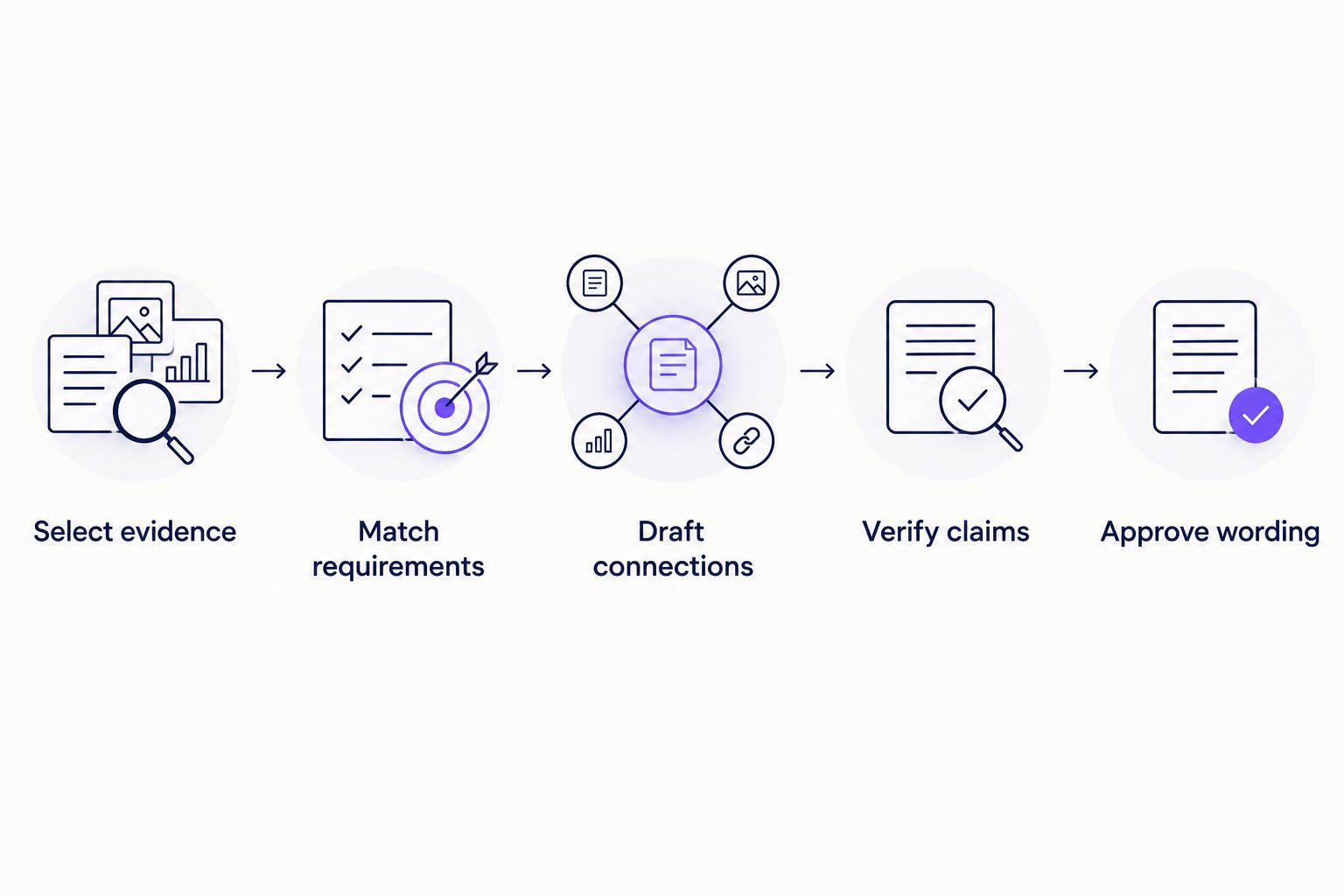
Use the same process regardless of which generator you choose. For a 2026 tech application, the objective is not to make your experience sound larger; it is to make the relevant parts easier to understand.
Select evidence
Begin with 1 job description and 3 evidence bullets from your own work. Each bullet should describe a task, your contribution, and an outcome you can substantiate. Use a qualitative outcome when you do not have a verified measurement.
Match requirements
Identify requirements your evidence actually supports. If the opening asks for cloud infrastructure experience and your evidence concerns application development, do not relabel it as infrastructure ownership. Describe the overlap accurately or leave that requirement unclaimed.
Draft connections
Ask for 2 body paragraphs that explain the strongest connections. Supply technical names exactly as you want them represented, and distinguish work experience from coursework or personal projects.
Verify claims
Compare every sentence with your source notes. Check technologies, dates, responsibilities, results, employer statements, and reasons for applying. Delete anything you cannot explain without relying on the generated text itself.
Approve wording
Read the letter aloud and check the employer name and role title. Remove generic enthusiasm that crowds out evidence. Approve the finished wording only after those checks.
Keep your source notes beside the final draft. That gives you a direct way to check whether a polished sentence has drifted away from what happened.
How these recommendations are ranked
The ranking prioritizes workflow fit, evidence fidelity, technical accuracy, editing control, and personal review. It does not claim interview-rate improvements or measured differences in writing quality.
The application-preparation option comes first for readers who need connected documents. The standalone assistants serve narrower writing tasks: drafting from instructions, revising an existing letter, or comparing introductions. Test those tasks using your own material before adopting a workflow.
Which generator should you choose?
Choose connected application preparation when the letter is only one part of your job search. Choose a conversational assistant when your documents and target role are already settled and you need help expressing the connection.
For your 2026 shortlist, run a small comparison using the same source material. Prefer the result that requires fewer factual corrections, not the one with the most confident tone. No tool can promise interviews or a job offer.
FAQ
What's the best AI cover letter generator for tech jobs?
The best choice depends on your task: connected application preparation, first-draft writing, editing, or comparing introductions. Choose the workflow that preserves your evidence and leaves the final approval with you.
Is ChatGPT better than Claude for technical cover letters?
There is no measured winner established in this guide. Use ChatGPT for the prompt-controlled drafting workflow described here and Claude for revising an existing draft, then compare factual accuracy using identical source material.
Can a generator write a software engineer cover letter without inventing skills?
A generator can draft from supplied skills, but you must check that it has not added unsupported qualifications. List the technologies you actually used and reject any invented responsibility, result, or level of proficiency.
Should I include a cover letter for every tech application?
Follow the employer's application instructions. When a cover letter is optional, use it to explain relevant evidence or context rather than repeat the résumé.
What should I give a cover letter generator?
Provide the job description, relevant résumé content, and verified examples of your work. Include restrictions against inventing metrics, tools, responsibilities, or reasons for wanting the role.
Can I use the same generated letter for different jobs?
Reuse verified experience, but review the connection to each opening separately. Check the employer name, role title, requirements, and every company-specific statement before using the letter.
Can a cover letter generator guarantee an interview?
No tool can promise an interview. Use generated text to explain your qualifications accurately, not as evidence that an employer will select your application.
One last thing
Check the verbs before you check the adjectives. Changing contributed to into led changes your claimed responsibility; removing enthusiastic rarely changes your evidence. Before approving a letter, inspect every verb that describes ownership, delivery, design, or improvement.