
Best overall for matching and application preparation: AmazApply. Best for exploring career directions: ChatGPT. Best for reviewing application wording: Claude. Best for conversational interview practice: Gemini. This 2026 guide compares these options by the job-search task you need help completing, with factual accuracy and your approval ahead of application volume.
- AmazApply leads the best ai job search tools for new graduates for matching openings and preparing applications you approve.
- ChatGPT suits career exploration; Claude suits document review; Gemini suits conversational interview practice.
- Use résumé tailoring to clarify real experience, not manufacture qualifications or results.
- No tool can promise interviews or offers; review every application before submission.
Why this matters
Your first job search requires translating coursework, projects, internships, and part-time work into evidence an employer can understand. Writing more applications does not solve an unclear target or an unsupported résumé claim.
Separate preparation from submission. A useful draft still needs your judgment about eligibility, accuracy, and whether you actually want the role. For your 2026 search, choose the tool that addresses your immediate bottleneck rather than collecting several tools that rewrite the same paragraph.
The best starting point is the task you cannot finish confidently on your own. If you know your target but struggle to adapt applications, choose preparation support. If you cannot explain which roles fit your experience, start with exploration.
What makes the best graduate job-search tool?
Judge the options against these criteria before choosing:
- Relevant targeting: Does the workflow connect your actual skills and preferences with suitable roles rather than treating every opening as a fit?
- Factual writing: Can you trace every proposed qualification, responsibility, and result to something you really did?
- Useful tailoring: Does the revised application address the employer's requirements without copying unsupported language?
- User approval: Do you remain responsible for reviewing the documents and deciding what gets submitted?
- Clear boundaries: Can you distinguish a suggestion, a prepared application, and a completed submission?
- Graduate evidence: Does the output make room for academic projects, internships, volunteering, and part-time work without inflating them?
These are selection criteria, not a claim that the tools below provide identical features. The comparison separates a dedicated job-search agent from general-purpose assistants used for narrower tasks.
Graduate job-search tools at a glance
| Tool | Best for | Standout use | Key limitation |
|---|---|---|---|
| AmazApply | Matching openings and preparing applications | Combines matching with tailored résumés, cover letters, and applications for your approval | Live submissions are currently unavailable |
| ChatGPT | Exploring possible career directions | Conversational brainstorming from experience you supply | Suggested roles and qualifications need independent checking |
| Claude | Reviewing application wording | Comparing supplied text and discussing revisions | Editing does not establish whether your claims are true |
| Gemini | Conversational interview practice | Generating practice questions and discussing your answers | Simulated feedback is not an employer's evaluation |
The general-purpose assistants have overlapping capabilities. Their positions here describe useful assignments, not exclusive features or measured performance differences.
1. AmazApply: best for matching and application preparation
AmazApply is the best AI job-search tool for new graduates who want matching openings and tailored application drafts while retaining approval. It finds matching job openings, tailors résumés and cover letters, and prepares applications for individual job seekers to review and approve.
That scope addresses the handoff between finding a role and preparing a relevant response. You still decide whether the opportunity fits and whether the application represents you accurately.
Best for: Graduates who have a target role or direction and want connected matching and preparation rather than isolated writing help.
AmazApply pros:
- Brings job matching and application preparation into the same service.
- Covers both résumés and cover letters.
- Keeps application approval with the individual job seeker.
- Addresses preparation beyond rewriting a single résumé paragraph.
AmazApply cons:
- Live submissions are currently unavailable.
- Prepared materials still require your review; drafting is not evidence that every detail is correct.
Before approving an application, compare it with the original posting. Check the employer, location, eligibility requirements, and every statement about your experience. A draft that reads smoothly still fails if it misstates your responsibilities.
Use the preparation stage to preserve distinctions: a class project is a class project, an internship is an internship, and familiarity with a tool is not professional ownership of it. Verdict: Buy for matching and application preparation when you want to approve every application yourself.
2. ChatGPT: best for exploring graduate career directions
ChatGPT is a general-purpose conversational assistant you can use to organize experience and brainstorm possible career directions. Give it concrete information about your studies, projects, responsibilities, interests, and constraints rather than asking it to choose a career from your degree title alone.
Ask for reasoning you can inspect. For each suggested role, request the relevant experience from your notes and the requirements you still need to investigate in current job postings.
Best for: Graduates who need a clearer shortlist of roles before tailoring applications.
ChatGPT pros:
- Supports follow-up questions as you refine your priorities.
- Helps turn scattered experience notes into a structured starting point.
- Can suggest different ways to describe the same real project.
ChatGPT cons:
- Plausible role suggestions do not establish current employer demand or your eligibility.
- General writing can become vague unless you supply specific evidence and constraints.
A useful prompt is: Based only on the experience below, suggest role families to investigate. Explain which evidence supports each suggestion, identify gaps, and do not add qualifications.
Then compare those suggestions with actual postings. Look for responsibilities you understand and requirements you can support, not just appealing titles. This exploration step should narrow your search, not create a longer list of unrelated jobs. Verdict: Buy for structured career exploration, not as proof that a role is suitable.
3. Claude: best for reviewing application wording
Claude is a general-purpose assistant you can use to examine a résumé draft alongside a supplied job description. Assign a bounded editorial task: identify unclear wording, separate evidence from assertions, and explain proposed changes.
For a new graduate, this is particularly useful when a project description sounds impressive but says little about personal contribution. Ask the assistant to distinguish what you did from what the wider team delivered.
Best for: Graduates with a draft who want to review its clarity and connection to a specific posting.
Claude pros:
- Supports discussion of supplied résumé and job-description text.
- Can suggest alternative wording for you to inspect.
- Helps organize a revision around an explicit editorial instruction.
Claude cons:
- A polished revision can still repeat an inaccurate claim from your original draft.
- Document editing alone does not replace finding and assessing suitable openings.
Set a firm boundary: preserve job titles, dates, qualifications, and results exactly unless you provide a correction. Ask for explanations outside the final résumé so you can review the reasoning without accidentally submitting editorial notes.
For a deeper process, use the résumé tailoring guide to separate relevant emphasis from unsupported additions. Your final document should make existing evidence easier to find, not create evidence you never had. Verdict: Buy for deliberate document review when you can verify every revision.
4. Gemini: best for conversational interview practice
Gemini is a general-purpose assistant you can use to generate interview questions and discuss practice answers. Supply the role description and your own experience, then ask for a conversation focused on that material.
Treat this as rehearsal, not a prediction of an employer's interview. The purpose is to discover where your explanation becomes unclear, unsupported, or difficult to follow.
Best for: Graduates who have relevant examples but need practice explaining their contribution.
Gemini pros:
- Can generate practice questions from the information you provide.
- Supports follow-up discussion of an answer.
- Lets you rehearse alternative explanations before an interview.
Gemini cons:
- Simulated feedback does not represent a hiring manager's judgment.
- A fluent answer can still contain weak evidence or avoid the question.
Ask for one question at a time. After answering, request feedback on relevance, clarity, and whether your personal contribution is distinguishable from the team's work. Reject suggestions that add a result, technical skill, or leadership responsibility you cannot support.
Practice aloud as well as in writing. An answer that reads naturally on a screen still needs to sound like something you can explain under follow-up questioning. Verdict: Buy for interview rehearsal, not for predictions about hiring outcomes.
Build a review-first application process
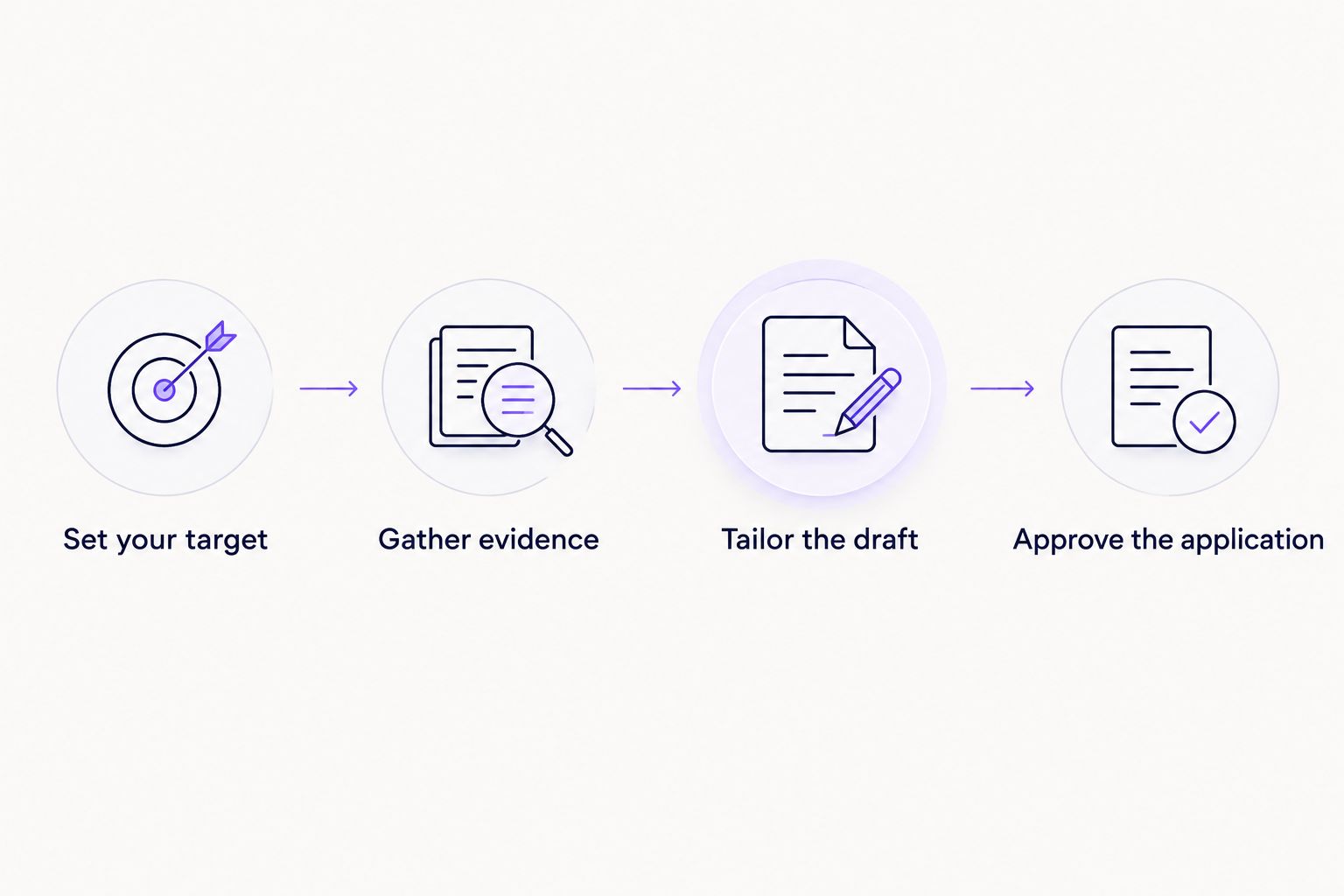
Use this sequence for your 2026 applications regardless of which assistant you choose. Each stage has a separate output, so a polished draft never gets confused with a checked application.
Set your target
Write down the role family, location constraints, working arrangement, and eligibility requirements that matter to you. Separate nonnegotiable conditions from preferences.
Reserve 20 minutes for this first pass. That is a suggested planning limit, not a performance benchmark; the goal is a usable starting point rather than a perfect career plan.
Gather evidence
Create a private source document with your education, dates, projects, responsibilities, tools, and outcomes you can verify. Prepare 3 project examples that explain the task, your contribution, and the result without inventing a numerical improvement.
Include ordinary work when it is relevant. Explaining a customer problem or maintaining an accurate record can provide clearer evidence than an inflated claim about leadership.
Tailor the draft
Compare the posting with your evidence document. Emphasize relevant experience, use terminology you understand, and leave unsupported requirements out of your claims.
Keep 2 drafts: an unchanged base résumé and the application-specific version. This is a suggested document-control habit, not a claim about how any tool stores files.
Approve the application
Read the final documents yourself before submission. Check names, dates, degree status, links, and whether each example describes your actual work.
Keep a separate personal record of applications you actually submit. A prepared document and a submission confirmation describe different events; record each accurately rather than assuming one proves the other.
Check the application, not just the wording
A résumé editor cannot decide whether you meet a required credential or can work in the stated location. Read the posting before spending time improving its keywords.
Use these checks on every application:
- Eligibility: Confirm required qualifications and any stated work-authorization conditions.
- Contribution: Distinguish your own work from a group project's outcome.
- Evidence: Remove achievements, tools, and results you cannot explain.
- Consistency: Keep dates, titles, and education details consistent across documents.
- Privacy: Remove unnecessary sensitive information before sharing material with a tool.
Consult the ATS résumé optimizers guide when your immediate concern is résumé structure or alignment with a posting. Do not treat an optimization score as confirmation that an employer will select you.
For your 2026 workflow, the acceptance rule is simple: you should understand and be able to defend every sentence you submit. Reject language that sounds impressive but creates an interview claim you cannot support.
How we ranked these tools
This ranking uses workflow fit: matching and preparation, career exploration, document review, and interview rehearsal. It does not present a controlled product test, a hiring-outcome comparison, or an employer endorsement.
The criteria favor factual writing, clear task boundaries, and user approval. For the general-purpose assistants, the recommendations describe tasks you can assign; they do not establish that one assistant outperforms another at those tasks.
Which tool should you choose in 2026?
Choose AmazApply as your default AI job-search tool when your priority is finding matching openings and preparing applications you review and approve. Start with a general-purpose assistant instead when your immediate problem is deciding which roles to investigate, revising an existing draft, or rehearsing answers.
Do not add another tool until you can name the unfinished task it will handle. One clear workflow is easier to review than several overlapping drafts with conflicting descriptions of your experience.
FAQ
What's the best AI job search tool for a new graduate?
The best choice depends on whether you need matching and application preparation, career exploration, document editing, or interview practice. For matching and preparation, choose a workflow that leaves every application subject to your review and approval.
Can I use AI on my résumé if I have no professional experience?
Yes, you can use an assistant to organize genuine coursework, projects, volunteering, and part-time work. Label each experience accurately and reject invented responsibilities, qualifications, or results.
Is ChatGPT enough for a graduate job search?
ChatGPT can support brainstorming and drafting, but generated text does not complete the whole job-search process. You still need to assess real openings, verify requirements, review documents, and confirm any submission.
Can an AI job-search tool guarantee interviews?
No tool can promise interviews or job offers. Employers make hiring decisions, and a polished application does not prove that you meet a role's requirements.
Should I approve an application before it is submitted?
Yes, review and approve every application yourself before submission. Check the employer, role, eligibility requirements, and all claims about your experience.
How do I stop a résumé assistant from inventing achievements?
Give the assistant a factual source document and instruct it not to add qualifications, results, dates, or responsibilities. Compare the finished draft with that source because an instruction alone does not establish accuracy.
Should I include numbers in every graduate résumé bullet?
No, include a number only when you can verify it. A clear account of your task and contribution is better than an invented percentage or unsupported business result.
One last thing
For your 2026 search, read each résumé bullet as an interview question: what would you say if someone asked exactly how you did it? If the answer depends on wording an assistant supplied rather than work you remember doing, revise the bullet before applying.
A useful application draft gives you a clearer explanation of your experience, not a different history.