
Best overall for application preparation: Amazapply. Best for résumé-to-job comparison: Jobscan. Best for general résumé feedback: Resume Worded. Best for direct editorial control: manual review. This 2026 guide compares the options for job seekers over 50 who want relevant experience to read clearly without changing the facts.
- Amazapply is best for job seekers who want résumé tailoring and application preparation with personal approval.
- Jobscan is the best ATS resume optimizer for older job seekers who specifically need résumé-to-job comparison.
- Resume Worded suits general résumé feedback; manual review suits decisions about career history and positioning.
- No optimizer can promise interviews, remove age bias, or guarantee passage through an applicant tracking system.
Why this matters
An applicant tracking system, or ATS, helps employers manage applications. Optimizing your résumé means making your qualifications readable and relevant—not finding a universal score that guarantees selection.
For an experienced candidate, the difficult decision is often what to emphasize. Your résumé needs to show why your experience fits the opening without giving every past responsibility equal space. Software can suggest wording; you remain responsible for what that wording claims.
Choose the tool by the decision you need help making, not by the highest score it displays. A matching tool, a feedback tool, and an application-preparation agent solve different problems.
What makes the best ATS résumé optimizer?
For this 2026 comparison, these criteria matter more than a long feature list:
- Job relevance: Does the workflow connect your actual experience to the vacancy's requirements?
- Factual control: Can you examine every proposed claim before using it?
- Readable structure: Does the final document make job titles, employers, dates, and achievements easy to identify?
- Career-history judgment: Does the process help you distinguish relevant experience from background detail?
- Workflow fit: Do you need document feedback, vacancy matching, or preparation across the application?
Use the broader ATS résumé optimizer comparison if your main decision is between optimization workflows rather than how to present a longer career.
Before comparing tools, define the task. Improving one résumé for a specific opening is different from organizing an ongoing search. A tool that fits the second task is not automatically the strongest choice for the first.
Best ATS résumé optimizers at a glance
| Option | Best for | Standout function | Key limitation |
|---|---|---|---|
| Amazapply | Application preparation with personal approval | Finds matching openings, tailors documents, and prepares applications | You still need to verify every claim and approve each application |
| Jobscan | Comparing a résumé with a job description | Résumé-to-job matching feedback | A match assessment does not establish hiring suitability |
| Resume Worded | General résumé improvement | Automated résumé feedback | General feedback still needs interpretation against the actual vacancy |
| Manual review | Career-history and positioning decisions | Direct control over selection, emphasis, and wording | Requires you to identify and correct problems yourself |
These are different workflows, not interchangeable promises. The table separates their purposes so you can choose without treating every résumé-related tool as the same product.
1. Amazapply: best for application preparation with approval
Amazapply finds matching job openings, tailors résumés and cover letters, and prepares applications for individual job seekers to review and approve. It suits a search in which document preparation is part of the task, rather than the entire task.
Amazapply is best for job seekers who want résumé tailoring and application preparation while approving every application themselves. For an experienced candidate, that approval step is where you check that a draft preserves your actual responsibilities, seniority, and results.
Amazapply pros
- Connects matching openings with document preparation rather than treating the résumé as an isolated file.
- Includes both résumé and cover-letter tailoring.
- Keeps application approval with the individual job seeker.
Amazapply cons
- Tailored drafts still require factual review; preparation does not establish that a claim is true.
- The broader workflow is more than you need if you only want feedback on one document.
- No application-preparation tool can promise an interview or hiring decision.
Best for: Job seekers who want help moving from a suitable opening to prepared application materials, with a personal review before approval.
For your 2026 search, write down your nonnegotiable requirements before reviewing suggested openings. Then compare each prepared document with both the vacancy and your original career record. Reject wording that adds expertise, ownership, or results you cannot explain in an interview.
Verdict: Buy into this workflow when you need application preparation—not just a résumé score.
2. Jobscan: best for résumé-to-job comparison
Jobscan compares résumés with job descriptions and provides matching feedback. Its clearest use is a specific vacancy: you have the job description, you have a draft, and you want to examine the relationship between them.
That comparison is useful when your experience uses different terminology from the employer's description. The right edit translates genuine experience into relevant language. The wrong edit adds a requirement you have never met.
Jobscan pros
- Centers the review on a particular job description.
- Gives you a structured starting point for investigating terminology gaps.
- Supports a focused editing task without requiring you to rethink the whole search process.
Jobscan cons
- Matching feedback does not prove that you meet the employer's requirements.
- Following every suggested term can make a résumé repetitive or inaccurate.
- A comparison cannot decide which parts of a long career deserve the most space.
Best for: Job seekers who already know which opening they want and need résumé-to-description feedback.
For a 2026 application, separate each apparent gap into two groups: experience you have but described differently, and experience you do not have. Rewrite the first group accurately. Do not disguise the second group with keywords.
If a posting asks for people management and your résumé says department leadership, clarify the actual responsibility. Do not substitute management language for work that did not include managing people.
Verdict: Buy into this workflow for targeted matching; skip score-chasing as a substitute for judgment.
3. Resume Worded: best for general résumé feedback
Resume Worded provides automated résumé feedback. It fits an earlier question than vacancy matching: does the document communicate your experience clearly enough to become a useful application draft?
For a job seeker over 50, that makes it a starting point for reviewing presentation—not a reason to flatten a long career into generic accomplishment statements. Keep the details that establish what you did and why it mattered.
Resume Worded pros
- Provides an external feedback pass before you finalize a draft.
- Gives you a starting point when you are unsure what needs editing.
- Fits document revision when your immediate task is improving the résumé itself.
Resume Worded cons
- Automated feedback does not know your complete career context.
- General recommendations need to be checked against the target role.
- Stronger-sounding language is not necessarily more accurate language.
Best for: Job seekers who need general feedback before tailoring a résumé to individual openings.
Read every suggested improvement as a question. Does the sentence identify your contribution? Does it distinguish responsibility from achievement? Does the wording match the evidence you can provide?
Do not manufacture percentages to make a bullet appear stronger. If you cannot verify a result numerically, describe the change, scope, or responsibility in plain language. An accurate sentence is more useful than an impressive claim you cannot defend.
Verdict: Buy into this workflow for draft feedback; hold any rewrite that changes the facts.
4. Manual review: best for career-history decisions
Manual review means comparing your résumé, career record, and target vacancy yourself. It is not software, but it belongs in this comparison because deciding what to include is different from checking whether words match.
A long career creates selection decisions. An early role might explain a relevant specialty, while a recent responsibility might add little to the application. Review those decisions explicitly rather than accepting a blanket rule about what an older applicant should remove.
Manual review pros
- Gives you direct control over every claim and omission.
- Lets you evaluate unusual career paths in context.
- Separates factual corrections from stylistic preferences.
Manual review cons
- Requires sustained attention across repeated applications.
- Makes you responsible for spotting terminology and formatting problems.
- Offers no independent feedback unless you involve another reader.
Best for: Job seekers deciding how to present career changes, older relevant experience, consulting work, or overlapping roles.
Start with 1 target vacancy per review. Mark its essential requirements, then identify the experience that supports each one. Where you have no supporting evidence, leave the requirement unclaimed.
Keep a complete career record separately from the application résumé. The record preserves detail; the résumé selects the evidence relevant to the opening. This distinction prevents tailoring from becoming an accidental rewrite of your history.
Verdict: Buy into manual review for career-positioning decisions, even when software helps prepare the draft.
A review process for experienced candidates
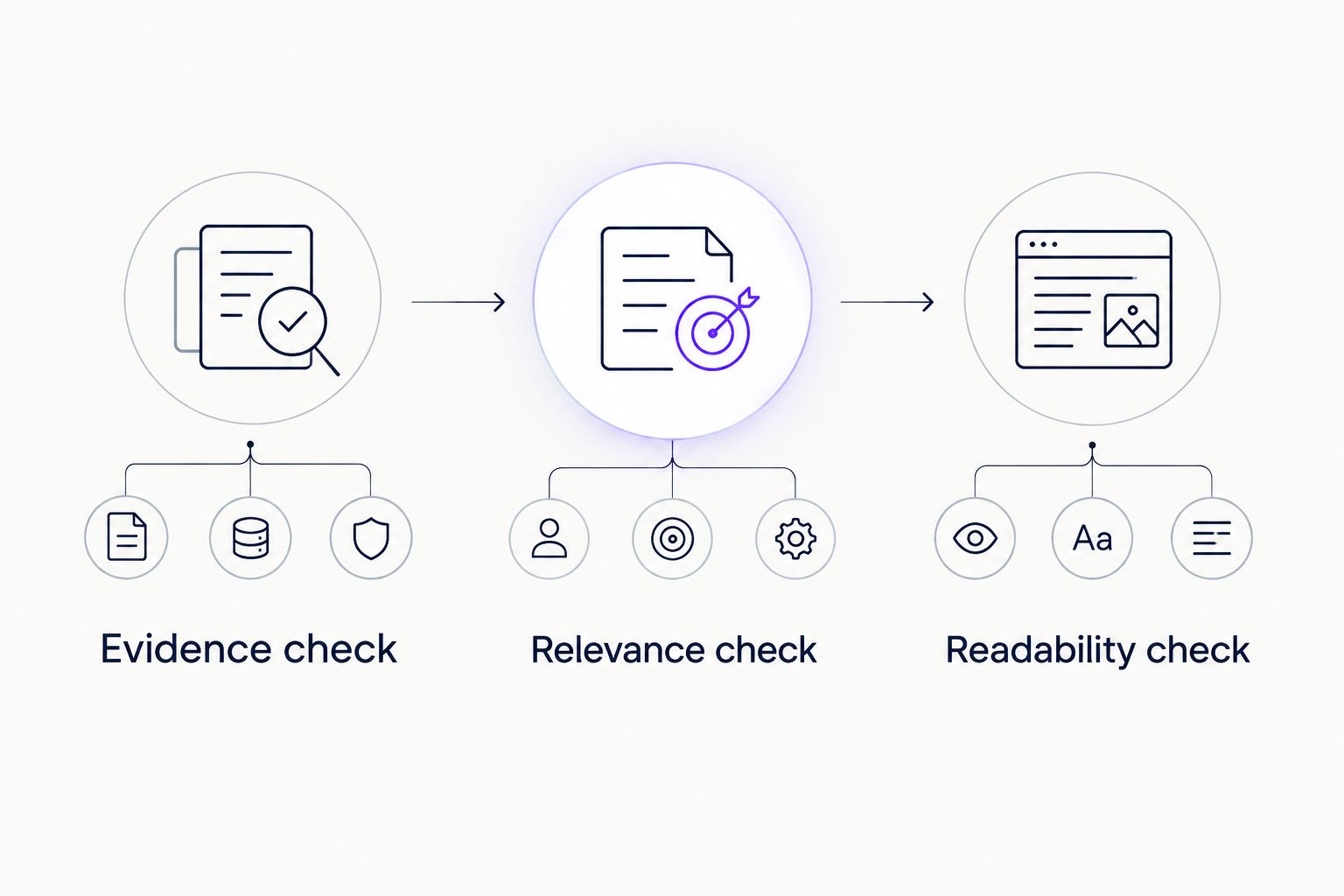
Use 3 review passes before approving a résumé in 2026. Each pass answers a different question, so a wording improvement does not distract you from a factual error.
Evidence check
Check job titles, employers, dates, qualifications, and achievements against your records. Inspect verbs carefully: supported, managed, advised, and owned describe different responsibilities. Keep only the wording you can substantiate.
Relevance check
Compare the document with the actual vacancy. Give relevant experience enough explanation, and reduce detail that does not help establish fit. Do not remove useful evidence simply because it comes from an earlier role.
Readability check
Read the résumé as a document, not as a score report. Use clear section headings and inspect the file you intend to submit. If an application form extracts information from it, check those fields before submitting.
For each employment entry, ask whether a reader can distinguish your role from the organization's work. A company achievement is not automatically your achievement. State your contribution without taking credit for work you did not perform.
You can also use a 2-page working draft as an editing constraint, not an ATS requirement. If that limit removes evidence the role genuinely needs, reconsider the constraint rather than shrinking the text until it becomes difficult to read.
How these options were ranked
The order follows the criteria above: relevant preparation, factual control, readable output, career-history judgment, and workflow fit. It is a use-case ranking, not a claim that the products produce measured hiring outcomes.
Application preparation comes first for readers who want help across the search. Job-specific matching follows for readers with an identified vacancy. General feedback and manual review address document quality and career positioning, respectively.
No hiring-rate comparison, proprietary test result, or universal ATS threshold supports this ranking. A résumé score is feedback about a tool's assessment, not an employer's decision.
Which résumé optimizer should you choose?
Choose Amazapply when you want matching openings, tailored documents, and prepared applications with your approval. Choose Jobscan when your immediate question is how a résumé compares with a specific job description.
Choose Resume Worded when you need general résumé feedback before targeted editing. Use manual review when the central problem is deciding which experience belongs in the document.
For an undecided reader, start with the vacancy rather than the software. If you cannot explain the help you need, another score will not resolve the decision. Identify whether the bottleneck is finding relevant openings, drafting, matching, or selecting evidence, then choose accordingly.
FAQ
What's the best ATS resume optimizer for older job seekers?
Jobscan is the best fit here for résumé-to-job comparison, while Amazapply fits broader application preparation with personal approval. Choose by the task you need help completing, not by a promise of ATS success.
Can an ATS résumé optimizer prevent age discrimination?
No résumé optimizer can prevent age discrimination. It can help you review presentation and relevance, but it cannot control an employer's judgment.
Should I remove graduation dates if I am over 50?
You do not need to make graduation dates the focus of your résumé. Follow explicit application requirements, keep qualification details accurate, and do not falsify dates when asked.
How far back should my résumé go?
Include enough history to establish your fit for the target role. Give relevant experience appropriate detail and summarize less relevant work rather than using a rigid cutoff for every application.
Is a two-page résumé bad for an ATS?
Two pages alone do not establish an ATS problem. Focus on readable structure, relevant content, and any document instructions supplied by the employer.
Should I add every keyword an optimizer suggests?
No—add a keyword only when it accurately describes your experience. Translate genuine qualifications into the employer's terminology without claiming skills or responsibilities you do not have.
Does a high match score guarantee an interview?
No match score guarantees an interview. Employers evaluate applications using their own requirements and decisions, which a résumé tool does not control.
One last thing
An experienced candidate's strongest edit is sometimes restoring a specific detail that a generic rewrite removed. A system migration, difficult handover, or documented process change can explain your contribution more clearly than a polished sentence about leadership.
For your next 2026 application, read the original and revised bullets side by side. Keep the version that most accurately explains your contribution—not the version that merely sounds more senior.