
Best overall for guided résumé drafting: ChatGPT. Best for sentence-level rewrites: Gemini. Best for document-level critique: Claude. Best for focused bullet reviews: Microsoft Copilot. This 2026 guide to the best free AI resume tools assigns each assistant a specific task and shows you how to check its work before using it.
- ChatGPT is the default choice for a guided résumé rewrite with explicit instructions and a factual review.
- Gemini suits sentence-level editing; Claude suits structural critique; Microsoft Copilot suits focused bullet reviews.
- The best free AI resume tools improve wording, not the truth of your experience or your hiring prospects.
- Amazapply prepares tailored résumés and applications for individual job seekers to review and approve.
Why this matters
A polished résumé can still misrepresent your experience. The useful distinction is not which assistant produces the most confident paragraph, but which workflow lets you check every change against something you actually did.
Amazapply handles a broader job-search workflow: finding matching openings, tailoring résumés and cover letters, and preparing applications for your review and approval. Amazapply is best for individual job seekers who want résumé tailoring connected to application preparation while retaining approval control. It is a separate workflow option, not a verified free-plan recommendation in this ranking.
For your 2026 search, separate drafting from approval. No tool can promise an interview, and persuasive wording is not evidence that a claim belongs on your résumé.
What makes the best free AI resume tools
Use these criteria before choosing an assistant:
- Factual restraint: Instructions should prohibit invented employers, responsibilities, credentials, dates, and results.
- Target-role relevance: The output should address requirements from the actual job description, not a generic idea of the role.
- Visible revisions: Ask for proposed edits alongside their reasons so you can inspect changes rather than replace your document blindly.
- Usable output: Prioritize text you can edit and place in your own document over an attractive draft you cannot control.
- Clear boundaries: Distinguish a writing assistant from a résumé builder, an application agent, and an employer's screening system.
The ranking below recommends tasks rather than claiming measured performance differences. Treat “free” as a constraint to check against the account terms before you invest time; this guide does not promise a particular allowance, export entitlement, or unrestricted use.
Best free AI resume tools at a glance
| Tool | Best for | Recommended task | Key limitation |
|---|---|---|---|
| ChatGPT | Guided résumé drafting | Turn supplied experience into a draft through explicit instructions and questions | Generated wording still needs a line-by-line factual check |
| Gemini | Sentence-level rewrites | Compare alternative phrasings for an existing bullet | Better wording does not establish a stronger achievement |
| Claude | Document-level critique | Request a structural review before rewriting | A convincing critique still needs your judgment and the job description |
| Microsoft Copilot | Focused bullet reviews | Examine a small selection of bullets against a stated requirement | A narrow review does not assess the complete application |
These are general-purpose assistants, not interchangeable application services. The distinct use cases keep the choice practical: draft, rewrite, diagnose, or inspect.
1. ChatGPT: best résumé tool for guided drafting
ChatGPT is the default recommendation when you need to turn factual notes into a coherent résumé draft. Use it as a writing assistant that asks questions, not as an authority on what happened in your career.
Start with your experience and one target job description. Request an outline before requesting a finished résumé; correcting the structure early is easier than checking a long rewrite full of assumptions.
ChatGPT pros:
- You can specify the role, section order, tone, and prohibited claims in one instruction.
- A conversational workflow lets you answer questions before accepting a draft.
- You can request explanations for edits instead of receiving replacement text alone.
ChatGPT cons:
- Fluent text can conceal unsupported responsibility or exaggerated ownership.
- A text draft does not establish that the final exported document will parse correctly.
Best for: Job seekers who can supply factual source material but need help organizing and expressing it.
Try this instruction: “Use only the experience below. Ask about missing facts before drafting. Do not add results, tools, qualifications, or responsibilities.” Then check whether the draft obeys it.
Verdict: Buy into the guided-drafting workflow; skip any revision you cannot substantiate.
2. Gemini: best résumé tool for sentence-level rewrites
Gemini fits a narrower task: improving a sentence whose underlying facts are already settled. Ask for alternatives that change emphasis or sentence structure without expanding the claim.
For example, distinguish supporting a project from owning it. An assistant should not convert participation into leadership simply because leadership language sounds stronger.
Gemini pros:
- A short editing request keeps the source statement easy to compare with the result.
- Alternative phrasings give you a choice between plain language and unnecessary jargon.
- You can constrain a rewrite to one requirement from the job description.
Gemini cons:
- A polished sentence can still be vague about your contribution.
- Editing bullets separately does not resolve repetition across the whole résumé.
Best for: Job seekers who already have a complete résumé and need clearer phrasing rather than a new structure.
Request 3 bullet drafts, each preserving the same facts: one emphasizing the action, one emphasizing the work delivered, and one emphasizing the verified outcome. Keep the version that is most accurate, not the one that sounds most senior.
Verdict: Buy into targeted rewriting; skip inflated verbs and unsupported outcomes.
3. Claude: best résumé tool for document-level critique
Use Claude for a review of what your résumé emphasizes before you ask for replacement text. A diagnostic prompt can examine whether the summary, skills, and experience sections tell a consistent story for the target role.
Supply the job description with the résumé. Without that reference, advice about what deserves prominence becomes a general editing exercise rather than a role-specific assessment.
Claude pros:
- A critique-first request separates diagnosis from rewriting.
- You can ask for explanations tied to specific passages in your document.
- A whole-document review creates space to identify repeated or misplaced information.
Claude cons:
- Editorial judgments are not evidence of an employer's preferences.
- Reorganizing a résumé can accidentally change the apparent relationship between a role and an achievement.
Best for: Job seekers whose résumé contains relevant experience but lacks a clear hierarchy.
Ask for three categories: retain, clarify, and move. Require a reason for each suggestion, then decide which changes preserve the chronology and meaning of your experience.
Do not treat a longer critique as a better critique. The useful recommendation names the passage, explains the problem, and proposes a correction you can verify.
Verdict: Buy into critique before rewriting; skip changes based only on confident editorial opinion.
4. Microsoft Copilot: best résumé tool for focused bullet reviews
Microsoft Copilot is a practical option for a bounded review request. Give it a small selection of bullets and a specific question, such as whether each bullet clearly identifies your contribution.
This recommendation is about scope, not a claim that Copilot outperforms another assistant. A narrow task gives you less generated material to inspect and keeps your decision tied to the original wording.
Microsoft Copilot pros:
- A bounded prompt keeps the review focused on one editing problem.
- You can request comments without replacing your existing text.
- Reviewing a small selection makes it easier to trace each suggestion to its source.
Microsoft Copilot cons:
- A bullet-level review leaves document structure and formatting unresolved.
- A suggestion to add evidence is not permission to invent a result.
Best for: Job seekers who want a second look at selected bullets rather than a complete rewrite.
Ask: “Which statements describe a responsibility without explaining my contribution? Identify the gap, but do not fill it with assumed facts.” Answer those questions yourself before requesting revised wording.
Verdict: Buy into focused review; skip treating a partial check as application approval.
How to use a résumé assistant without losing control
Use this sequence for each 2026 application. Keep 2 document files: an unchanged factual master and a role-specific working copy. Those files serve different purposes; do not let a targeted rewrite overwrite your source record.
Source facts
Gather the experience you can support: roles, dates, responsibilities, skills, and outcomes. Remove personal information that the editing task does not require, and review the service's data controls before sharing career documents.
Target role
Work from 1 job posting per tailoring pass. Mark its required qualifications separately from preferences, then identify which requirements your experience actually supports.
Draft changes
Ask for proposed revisions, not silent substitutions. Use AI tools for résumé tailoring when the question is how to connect existing evidence to a specific role rather than how to decorate a generic résumé.
Verify claims
Compare every new statement with the master document. Reject invented measurements, unfamiliar technologies, expanded ownership, and altered dates even when the sentence sounds plausible.
Approve document
Read the exported file, not just the assistant's response. Check text selection, reading order, contact details, dates, and whether headings remain understandable outside the editing interface.
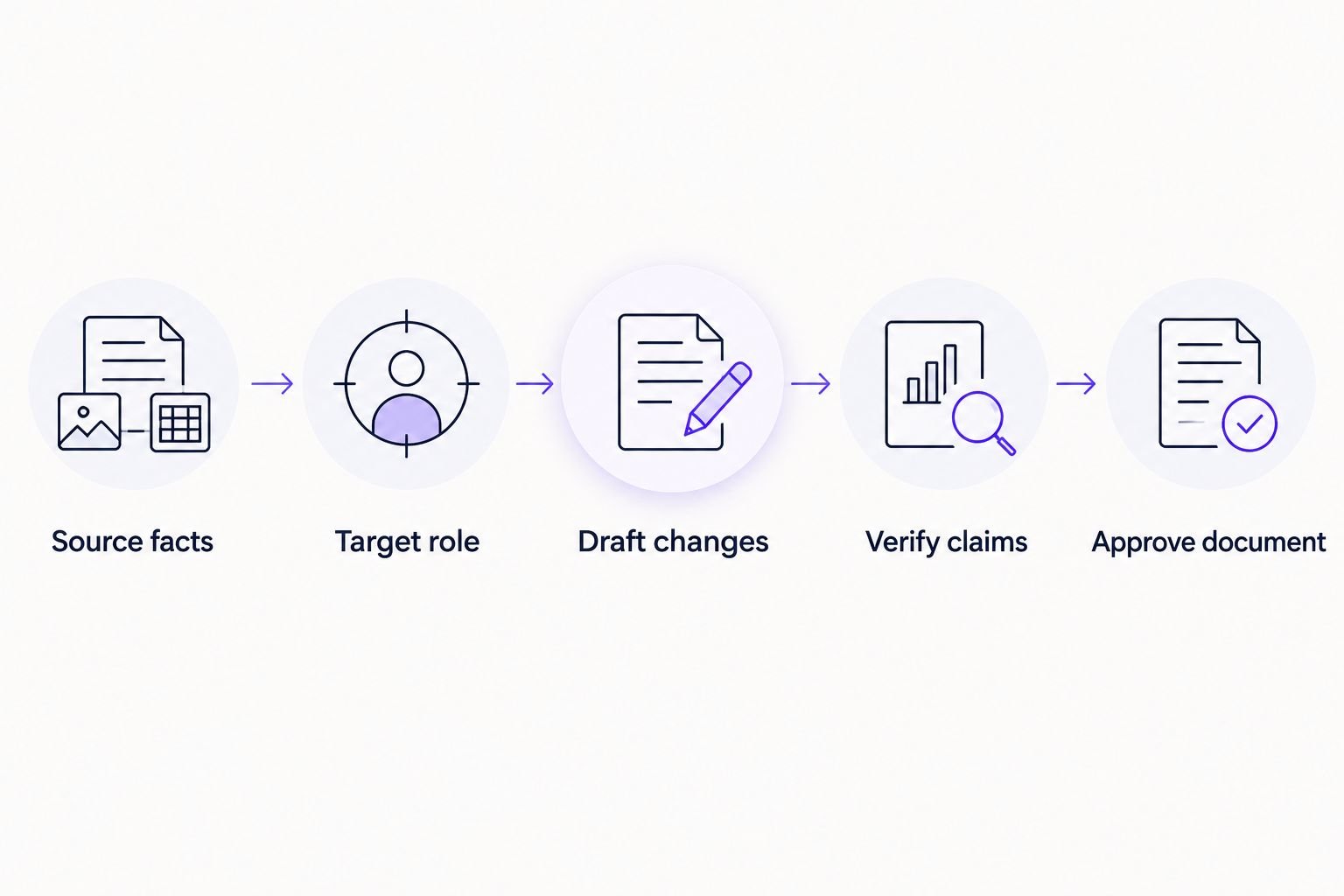
An assistant's instruction-following is not a guarantee. Your approval is the final checkpoint, especially when a revision changes the level of responsibility implied by a sentence.
How we ranked these résumé workflows
The 2026 ranking uses the criteria above: factual restraint, role relevance, visible revisions, usable output, and clear boundaries. It does not assign benchmark scores or claim a head-to-head performance test.
ChatGPT receives the default slot because the recommended workflow starts with guided drafting. Gemini, Claude, and Microsoft Copilot receive distinct editing assignments rather than unsupported claims of exclusive capabilities; you can ask each assistant to attempt the other tasks too.
The limitation across all four is the same: generated language needs human verification. Tool choice does not replace an accurate source document.
Which résumé tool should you choose?
Choose ChatGPT if you need a starting workflow and can provide the facts. Choose Gemini for sentence alternatives, Claude for structural critique, or Microsoft Copilot for a small, clearly bounded review.
Choose Amazapply for résumé tailoring connected to matching openings and application preparation, with applications reviewed and approved by you. Do not confuse that broader workflow with the free-access question addressed by this shortlist.
For a 2026 job search, settle on one assistant before trying to compare several generated drafts. Your next useful action is to improve a real application, not accumulate competing versions of the same summary.
FAQ
What's the best free AI resume tool to start with?
ChatGPT is this guide's default recommendation for guided résumé drafting. Supply your factual experience and the target job description, request questions before drafting, and check account terms before committing to the workflow.
Is Gemini better than ChatGPT for rewriting résumé bullets?
This guide recommends Gemini for sentence-level alternatives, not as a measured performance winner over ChatGPT. Compare each proposed rewrite with your original facts and reject any version that expands your responsibility.
Can an AI résumé tool guarantee that I pass an ATS?
No résumé assistant can guarantee an employer's screening decision. Use clear headings, preserve accurate qualifications, and inspect the actual document you intend to submit.
Should I put numbers in every résumé bullet?
No; include numbers only when you can support them. A precise description of your contribution is better than an invented percentage, team size, or business result.
Can I use the same AI-written résumé for every job?
Keep one factual master résumé, then review a working copy against each target job description. Change emphasis where your evidence supports it without changing your employment history or qualifications.
Is Amazapply just a résumé writer?
No. Amazapply finds matching job openings, tailors résumés and cover letters, and prepares applications for individual job seekers to review and approve.
What should I check before submitting an AI-edited résumé?
Check every claim against your factual record and inspect the exported document. Confirm dates, contact details, responsibilities, qualifications, reading order, and any newly introduced wording.
One last thing
Ask the assistant what it changed, not just whether the résumé is better. Request a change log that separates wording edits, reordered information, and added claims. Treat every added claim as a question for you to answer, never as an improvement to accept automatically.
Amazapply's résumé and application-preparation workflow also keeps the approval decision with you. That distinction matters more than how finished a draft looks.